Automated ad reports ›

Our own story

How SAL - AI automates its own Google Ads.

Reports land in a Google Sheet every morning, an email alerts us when a campaign has a problem, every customer who leaves a number is linked to their ad source, and draft campaigns are prepared for a person to approve. This is the system we use for sal-ai.vn itself.

Article by SAL - AI · Updated 10/2026

Start in the SAL software

Describe what you need and the assistant plans your Google ads.

Sign in with Google or a code sent by email, and the assistant drafts the plan right in your software (Ads → Assign tasks): keywords, ad copy, suggested budget. Connect Google Ads in the Ads section: sign in with Google and pick the account; ads only run once you agree.

Build a Google ads plan

The Free plan has 50 AI credits in the first month. Want SAL - AI to do it? Have SAL - AI do it.

Running ads is not as hard as monitoring them every day.

When we started running Google Ads for sal-ai.vn, we ran into exactly what every business owner running their own ads runs into:

  • Time lost opening reports. To know how much was spent yesterday and how each campaign did, you have to log in, pick dates and filter columns.
  • Problems are easy to miss. A campaign that stops showing, a disapproved ad or a "low search volume" keyword is often only noticed after several days.
  • Not knowing whether the money brings real customers. Google reports clicks and conversions, but the number of customers you actually reached and closed sits somewhere else.
  • Building new campaigns takes effort. Each ad group needs dozens of keywords, 15 headlines and 4 descriptions within character limits.

Instead of hiring someone to watch over it, we automated the repetitive parts and kept the decisions that spend money for people.

Four parts, each solving one job.

1. Automatic morning report

Google Ads data from every account flows into a Google Sheet at 7 a.m.

2. Alerts when something is off

An email is sent only when something needs attention; otherwise, silence.

3. Linking ads to real customers

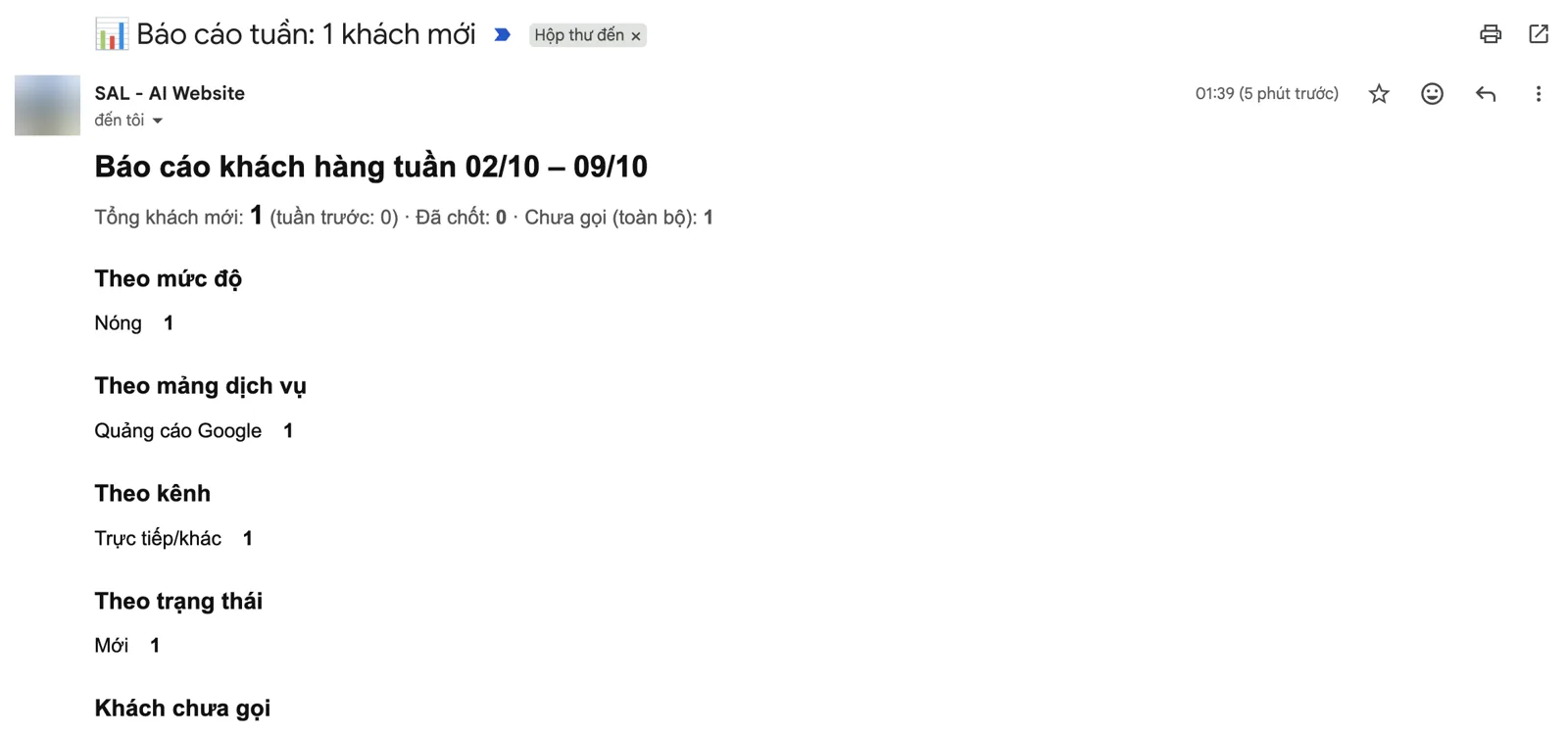
Customers who leave their details on the website are saved with their ad source and categorized automatically; the weekly report calculates cost per customer.

4. Building draft campaigns

Enter your business details and get a complete draft campaign for a person to approve.

Open the Google Sheet and see yesterday's numbers.

We use Google Ads Script, code that runs inside Google Ads on a schedule. All ad accounts are grouped under one manager account (MCC), so a single script covers them all.

  1. Every morning at 7. the script reads the last 90 days of data for each campaign: impressions, clicks, cost, conversions, daily budget
  2. Writes to a Google Sheet. one row per account per day, which anyone on the team can open, filter and chart
  3. Adding new accounts. no reinstall needed, the script picks up every account in the MCC automatically

The Google Sheet is the single source of "truth": ad numbers and the customer list live in the same file, so reconciling is quick.

The four alerts we found most necessary.

  1. Over budget. yesterday a campaign spent more than 1.5 times its daily budget. Google allows overspending within a day, so you need to know early
  2. Enabled but not showing. the campaign is on but has 0 impressions. Usually due to billing, verification, bids or low-search-volume keywords
  3. Disapproved ads. lists exactly which ad groups and ads violate policy so they can be fixed right away
  4. Spending without conversions. spent 300,000 VND or more over 3 days with no conversions: check keywords, landing page or tracking code

These thresholds can be adjusted to each business's budget. All alerts are combined into one email, grouped by account, so your inbox isn't flooded.

Know how much each customer costs in advertising.

This is the part many businesses skip. Cheap clicks aren't necessarily good if they don't bring customers. Here's how we do it:

  • When a customer clicks an ad to the website, the website records the Google click ID along with the traffic source.
  • When the customer submits a form or leaves a number in the chat window, the information is saved to a Google Sheet with that source, and the service area, level of interest and a summary of the need are recorded automatically. The person in charge gets an email immediately. Details on the Customer automation page.
  • On Monday morning, the weekly report matches Google Ads numbers with the customers from Google in the Sheet and calculates cost per customer.
  • Once there is enough data, customers marked "Closed" in the Sheet can be sent back to Google Ads as conversions, so Google optimizes for real closed customers instead of just form submissions.

From a few lines of description to a draft campaign.

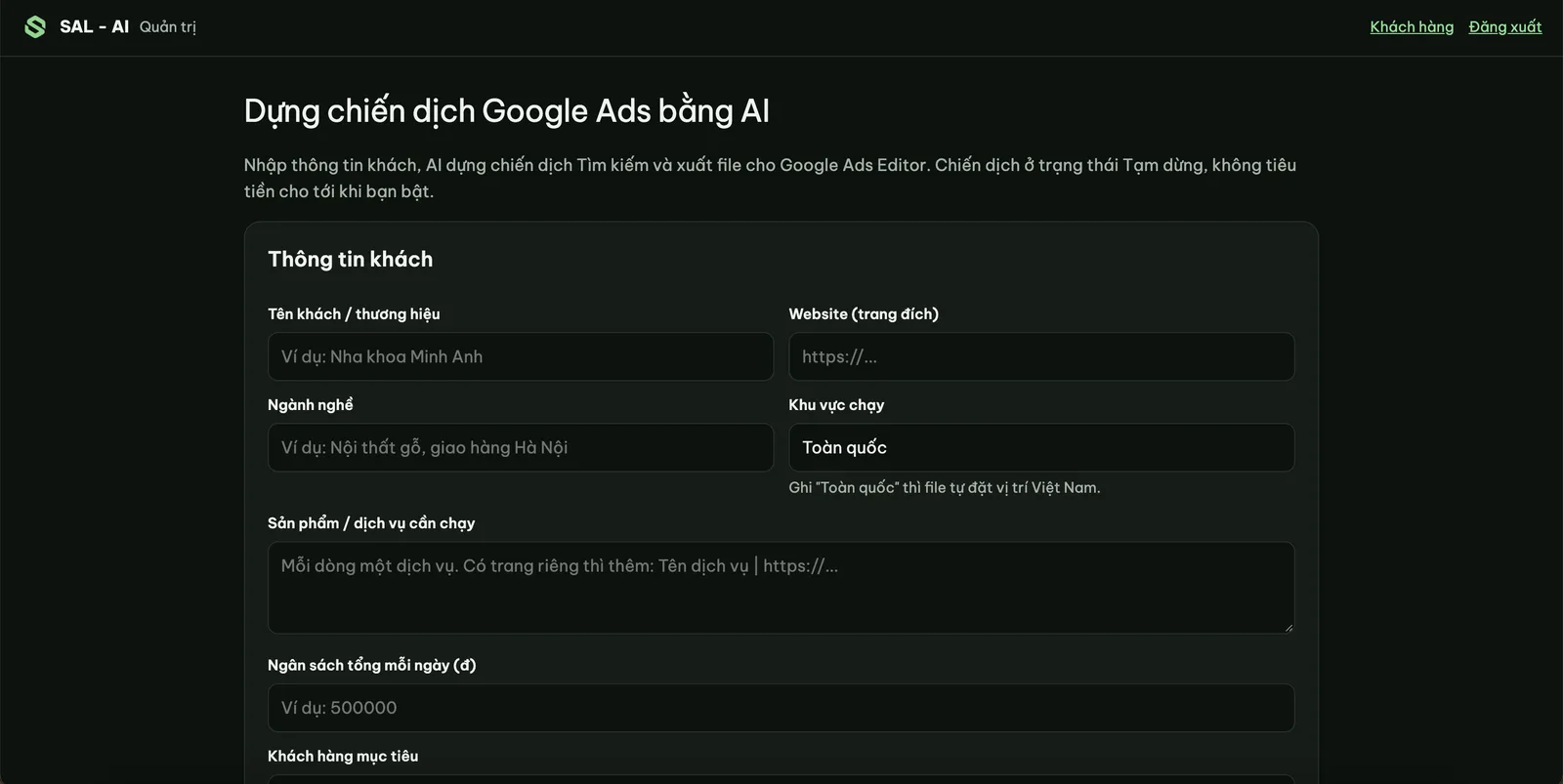
We built an internal tool: enter the business name, website, industry, services, area and daily budget. The tool returns a draft Search campaign including:

  • 1–3 campaigns, grouped by service or search intent, with a budget split.
  • Purchase-intent keywords for each group and a list of negative keywords.
  • 12–15 headlines and 4 descriptions per group, with character counts.
  • Suggested sitelinks, callouts and a checklist to review before publishing (for example, industries restricted by Google).

The tool checks itself before exporting: headlines over 30 characters, descriptions over 90 characters or landing pages outside the business's website are all rejected. The tool may only use the information entered and does not add prices, figures or words like "guaranteed" or "No. 1" on its own.

Results are exported to a file for Google Ads Editor, in Paused status. The person in charge reviews and edits it, and only enables it once the business owner has approved the content and budget.

Businesses can type what they need on the homepage, sign in and let the assistant plan right in the SAL software (Ads → Assign tasks), or have SAL - AI do it.

SAL - AI's Google Ads campaign builder
SAL - AI's internal tool: enter your business details and get a draft campaign for a person to approve.

The system does the repetitive work; people keep the decisions.

  • It does not spend money on its own. The system does not turn on campaigns, raise budgets or change bids.
  • No made-up content. Ad copy is based only on the business's real information.
  • Data stays with the business. Figures and customer lists live in the business's own Google Sheet and inbox.
  • AI can be wrong. Customer classification and ad drafts are suggestions to help people work faster; a person always reviews them.

Honest about results.

The system started running for sal-ai.vn in 10/2026, at the same time as the first Google Ads campaigns. At the time of writing there has not been enough time to get reliable figures on cost per customer or close rate, so we are not stating any numbers yet.

What is already clear is the time saved: no more opening Google Ads every morning to check, and a campaign draft takes a few minutes instead of a few hours. We will update this article with real figures after about 30 days of running.

What your business needs to use it.

  1. A Google Ads account. the business's own account, or an account managed by SAL - AI in our MCC if you hire us to run your ads
  2. A Google Sheet. to receive figures and customer lists
  3. Conversion tracking code on your website. your web developer installs it, or you grant Google Tag Manager access; if your website is not suitable, we build a separate landing page
  4. About one day of setup. install, test with real data, then hand over how to read the reports

The system only reads figures, sends alerts and writes drafts. Turning on campaigns, changing budgets or changing bids is always decided by the person in charge.

Real screenshots

What we use every day.

Screenshots from the system running for SAL - AI itself. Personal information has been hidden.

Automated weekly customer report email Internal tool that builds Google Ads campaigns

Left: the weekly report email sent automatically every Monday morning. Right: the internal tool that builds draft campaigns.

FAQ

Frequently asked questions

Do I need to know how to code?

No. Everything runs on Google Ads, Google Sheet and email. You only need to read emails and open the Sheet.

Does Google Ads Script cost anything?

No. Google Ads Script is a free Google Ads feature. Customer classification and draft campaign building do use AI, charged by usage, usually very little.

Does the system optimize my ads automatically?

It does not change anything on its own. It sends alerts and writes drafts; editing, turning on and changing budgets are still done by the person in charge after you approve.

Does it work with Facebook or TikTok?

Matching real customers, new-customer alerts and weekly reports work for every channel. The automated reports and alerts in this article currently cover Google Ads.

Need someone to work with you?

Want a similar system?

We set up reports, alerts and real-customer matching for your Google Ads account, or run your ads end to end with this system included. The first consultation is free.

Automated reports into Google Sheet.
Email alerts when something is unusual.
Cost per real customer, every week.

Read more:

Or contact us directly:
Message on Zalo
Ask us for advice

By sending this request, you agree that we may contact you about the above. See our Privacy policy.

Your request has been received.

Thank you. We will contact you to schedule a consultation.

About SAL - AI

How we work: transparent from the start.

SAL - AI is operated by Công ty TNHH Đầu tư và Phát triển Dịch vụ Truyền thông SAL (tax code 0110454937) and focuses on AI solutions and advertising on new platforms for businesses.

We commit through how we work, not through promises: a clear scope from the start, a budget you approve, accounts and website in your name, numbers you can check yourself, and for Google ads and websites a 100% refund of service fees if we have not started work.