 SAL - AI
Products
Your own management software,
built by chatting.
Every business gets its own software at name.salapp.vn: customers, messages, website, ads, orders, payments, shipping, accounting and tax. You build and edit it by messaging the assistant; the built-in sections are only a starting point and can be changed to fit the way you work. The software connects to 50+ services and has an open API and a connector for ChatGPT and Claude.
Price: Free plan 0 VND, no time limit, no payment card. Paid plans from 299,000 VND/month, excluding VAT. See pricing
By task (Vietnamese pages): How the SAL software works, All-in-one software, Multi-channel ads, Shared inbox, Auto Posting, 24/7 AI Chatbot. Latest updates: see What's new.
Customer management software (CRM)
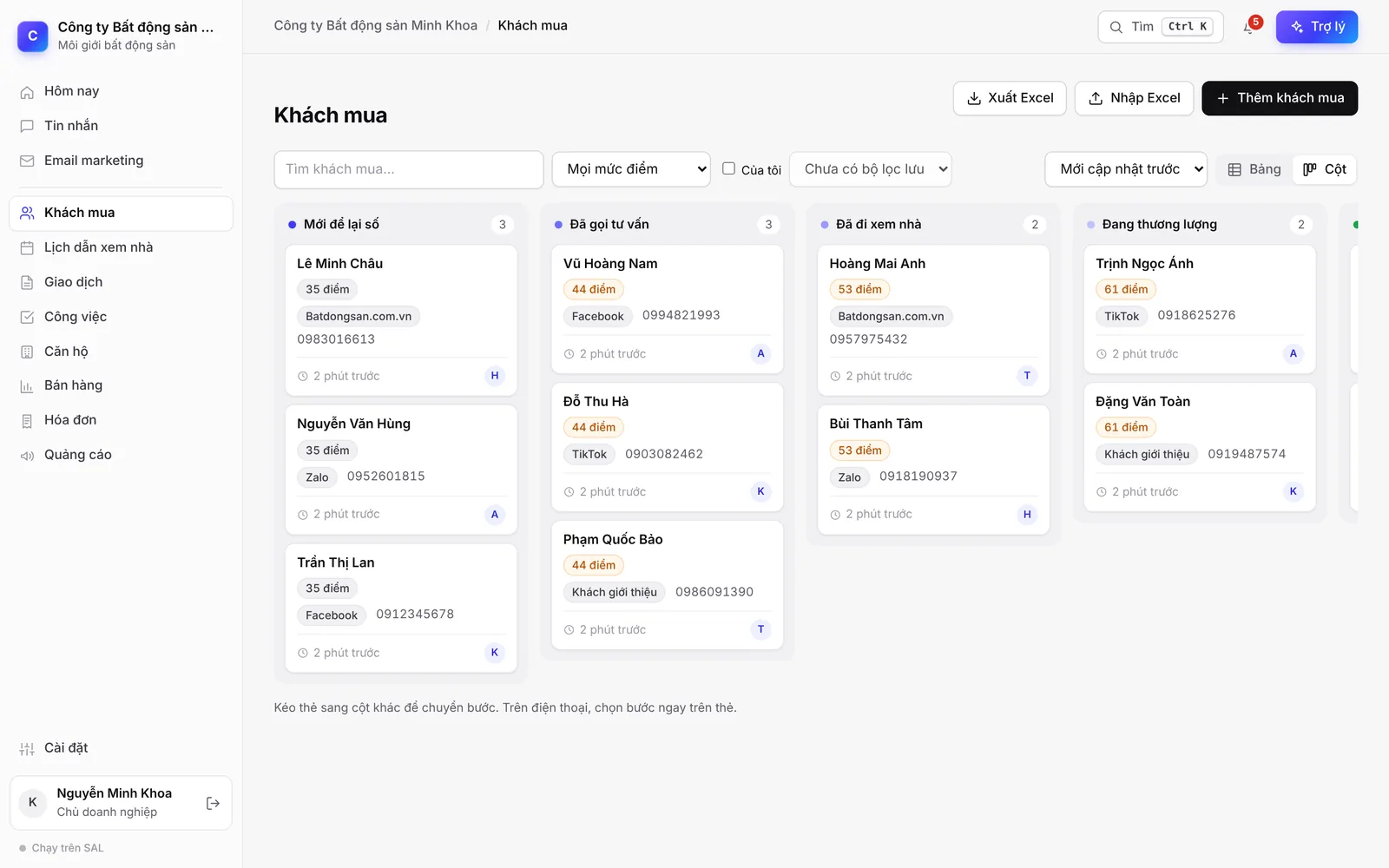
Each business gets its own software at name.salapp.vn with its own database, never shared with other businesses. The software starts empty: you describe how you work, and the assistant builds the sections, fields and workflows exactly that way, using your own terms.
- Drag-and-drop pipeline: customers move through your own stages (for example: left a number → called → viewed the property → deposit), and new customers enter the first stage automatically.
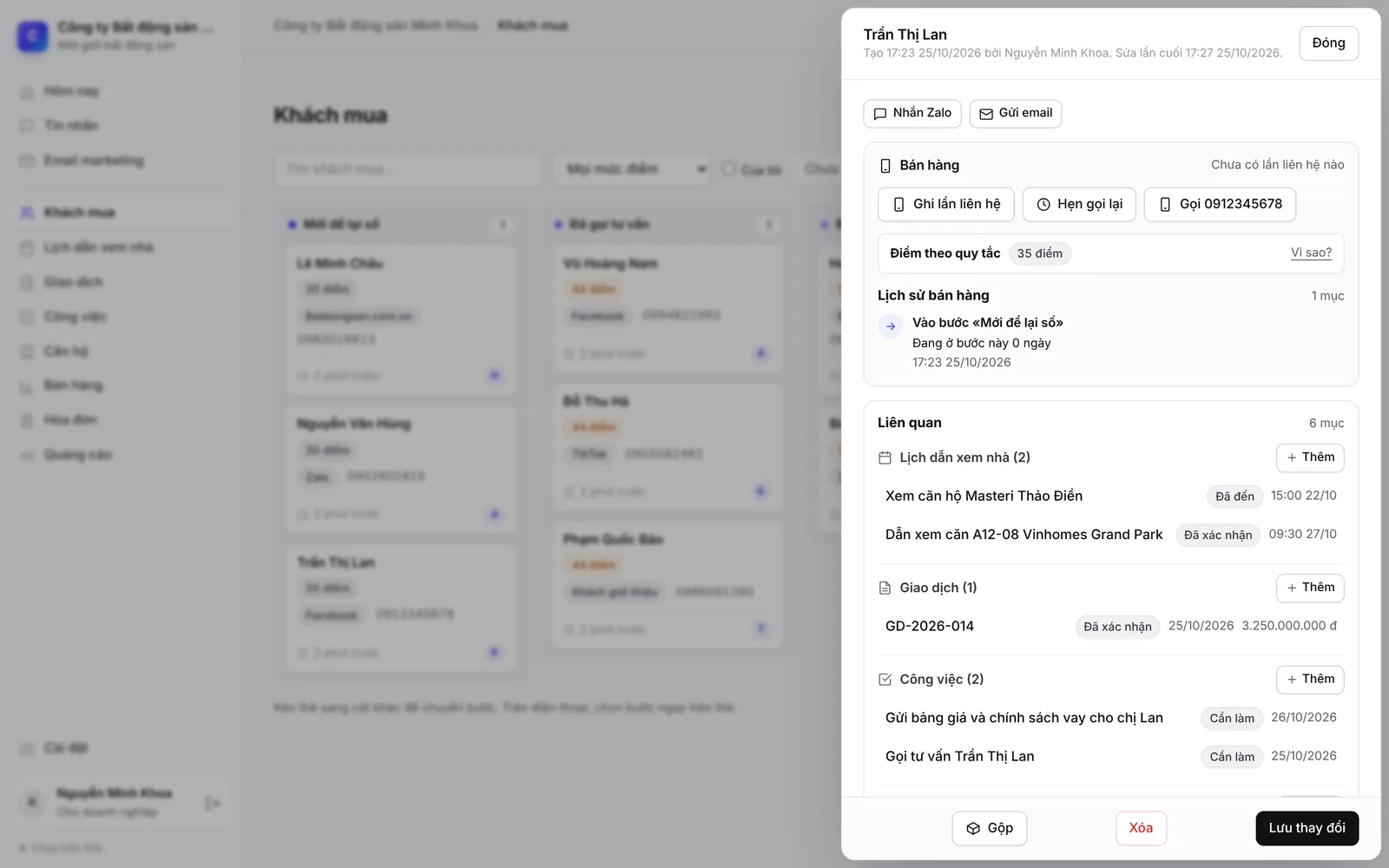
- Complete customer profile: appointments, tasks and deals for one customer in one place; call, message on Zalo or send email right from the profile.
- Sales tools: log contacts, schedule callbacks, lead scores, reasons for not buying, funnel reports by source and by salesperson.
- No duplicate customers: adding a customer whose phone or email already exists prompts you first, and merging duplicates takes one click.
- Permissions: owner, manager, staff, accountant, view only (plus teacher when you run classes); staff only see the customers they handle.
- Lead capture forms for your website, Facebook, Zalo; each submission becomes a new record.
- Sensitive fields are encrypted; every view is logged.
- Your data belongs to you: the business owner can download all of it at any time, as Excel (one sheet per section) with a full JSON copy. SAL staff can only get in when you grant time-limited access.
- See all the sections, steps and reports of the CRM template on the page CRM software for small businesses.
AI assistant to build your CRM
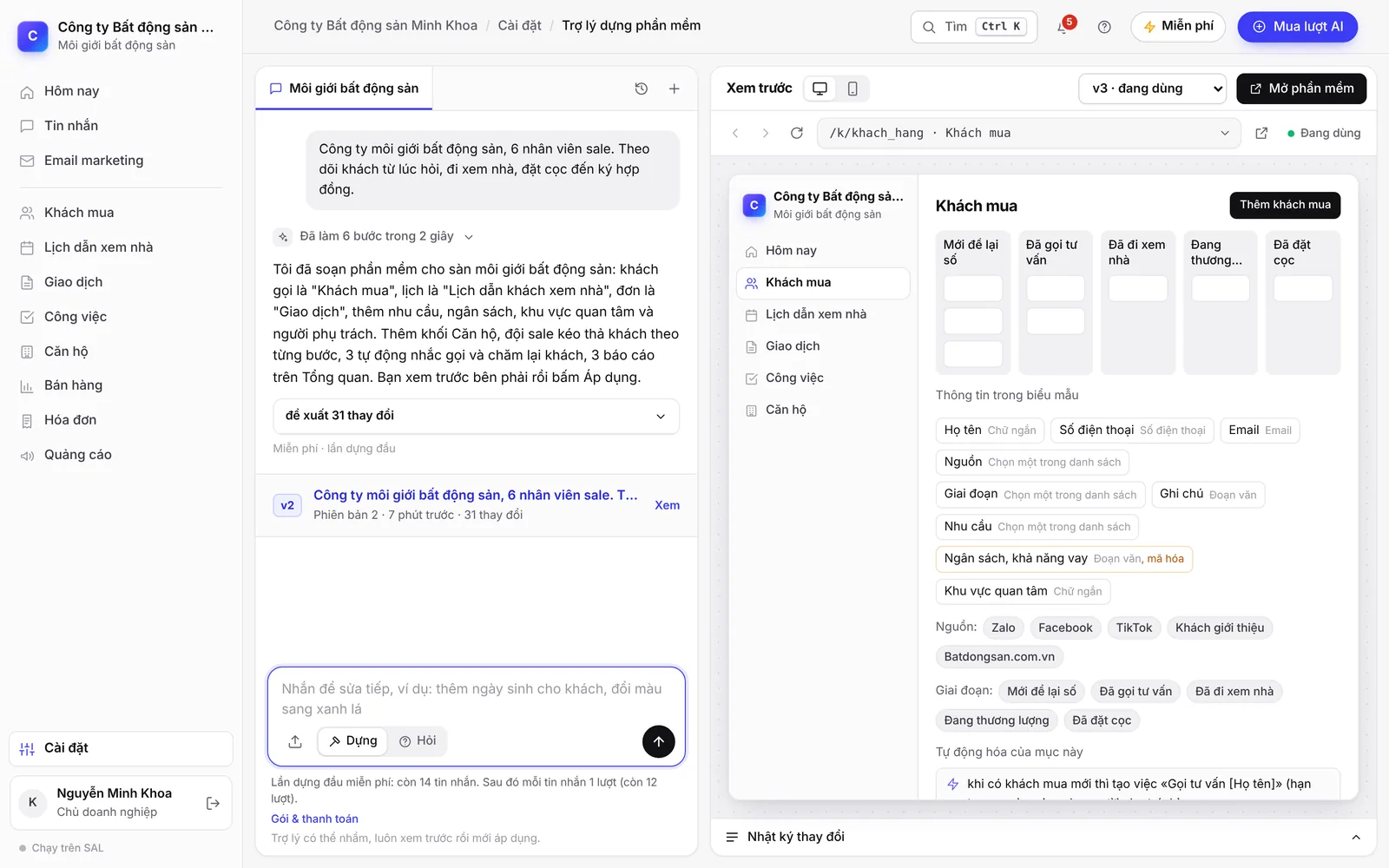
Describe in plain words what you need to manage, for example “add a deposit step for home buyers” or “remind me to call customers back after 3 days”. Changes are proposed for you to preview; the software only changes when you click Apply.
- Each applied change is saved as a version, and you can go back to an older one.
- Edits the code itself: when the built-in actions cannot do a job, the assistant writes code just for your software. You try it on a test copy with sample data; only the business owner can click Apply, and you can roll back. Code changes use more credits than settings changes, usually a few dozen credits per job.
- Click the exact spot on the screen (a button, column or cell) and send a message; the assistant changes exactly that spot.
- Three thinking levels: Standard, High, Maximum. Pick a higher level for hard jobs; higher levels use more credits.
- On the phone: switch between Chat and Preview with one tap; each job gets its own conversation.
- While building, only the configuration (names, fields, options) is sent to the assistant; customer data is not.
- AI credits: the Free plan has 50 credits in the first month, then 15 credits a month from the second month. Credits follow the actual AI usage: each message building or editing the CRM usually uses about 8–27 credits, shown right under the answer; when credits run out, the software keeps working as usual.
- Quick start: type your idea in the “What do you want to build?” box on the homepage, sign in with Google or an email code, and the assistant builds it right in your software.
- See each step and the industry templates on the page Build your own management software with AI.
AI employees
Describe the job in one sentence, for example “every Monday morning, list customers not called back last week and assign them to the person in charge”. The assistant drafts it: what to do, when, and what it may do. You edit it, test-run it on real data (it only logs “would do”, nothing is done), then turn it on.
Create one in the AI employees section or by messaging the Build CRM assistant.
- A ready-made AI staff team by role: Executive assistant (morning brief, end-of-day summary, weekly report, instant alerts), Sales (a morning call list for each salesperson, follow-up reminders, target tracking, new-lead assessment), Marketing (a content calendar for holidays and occasions, replies to Google reviews, a morning ad check, customer care emails), Accounting (matching incoming bank transfers, draft e-invoices, receivables with payment reminders that include a QR code, receipt photos turned into expenses, a monthly summary), Tax (revenue thresholds, preparation before filing deadlines), Customer care (appointment confirmations, no-shows, follow-ups after a service, Google review invitations, return invitations at the right interval), Warehouse and delivery (pending orders, failed deliveries, returns, draft purchase orders when stock runs low, slow-moving products, cash-on-delivery collections) and Student affairs (absence notices to parents, make-up classes, tuition reminders with a QR code, re-enrollment invitations). Turn on each task and set its time, recipients, scope and monthly AI credit cap; when there is nothing to do, no AI is used. Anything sent outside the business and anything involving money waits for your approval; customer messages go through the right channel (the conversation, Zalo ZNS, SMS, email), never at night, and at most 2 messages per customer per week.
- When it runs: on a schedule (daily, on chosen weekdays, monthly) or when a record is added or moves to a stage; you can also click “Run now”.
- What it may do: read data, assign tasks to people, send internal alerts, update record details, message customers in existing conversations (Zalo, Facebook Messenger, website chat). It acts with the permissions of the person who created it.
- Messages to customers wait for your approval: edit the text, then click Send. “Auto-send” can only be turned on for an AI employee after a good test run.
- One page gathers all AI and automated work that is running: message duty, writing and posting to the Fanpage, morning tasks, assessing new customers, reminders; each has a log and the credits used.
- AI credits: drafting uses about 1 credit, each run about 1–3 credits; failed runs are refunded. After 3 failures in a row it pauses itself and notifies its creator.
Multi-channel advertising
Connect your own business's ad accounts to see cost, leads and results right next to your customer list, and assign tasks to the assistant with one command. Google Ads, TikTok Ads and ChatGPT Ads are fully managed inside the software.
Want SAL - AI to run ads for you? See Done-for-you services.
- Tasks by command: for example “run message ads for the IELTS course in Hanoi, 300,000 VND a day”. The assistant drafts it with a checklist of the key points (goal, area, age, placements, budget per channel) and a preview. You confirm, and only then does the software create it; new campaigns are always paused.
- Google Ads: sign in with Google and pick the account. Managed as in Google Ads: Search, Performance Max, Display and Demand Gen campaigns; ad groups, keywords, negative keywords, search terms, audiences, asset groups; reports, conversions, Google recommendations, automated rules, experiments, change history. People who fill in a lead form on a Google ad become new customers automatically.
- TikTok Ads: grant account access right in the software; campaign, ad group and ad tables with figures, broken down by day, age, gender and province; create Smart+ campaigns; turn on, pause, change budgets.
- ChatGPT Ads: paste the API key of your OpenAI ad account; see the figures and assign tasks by command.
- Facebook & Instagram Ads: currently connected by sharing your ad account access with SAL - AI: see cost, leads and results; turn on, pause and change budgets when you approve. Sign-in with Facebook and full management like Ads Manager are awaiting Meta approval.
- Pick a date range like in the ad managers: today, yesterday, last 7, 14 or 30 days, this month, last month or a custom range.
- You always decide on money: turning on campaigns and changing budgets or bids only happens when the owner or a manager approves the exact figure.
- Each question to the ad assistant uses about 1–4 credits and each campaign draft about 2–6 credits; viewing figures uses no credits.
- Ad connections are included in every plan; each channel connects 1 ad account on Free, 2 on Basic, 5 on Professional and 20 on Business. You pay ad spend directly to each platform.
- All four channels, task commands, lead tracking and closed-order reporting (Vietnamese): Multi-channel ads.
Multi-channel messaging
Facebook Messenger, Instagram, Zalo OA and TikTok messages in one shared inbox in the software. First-time senders become new customers automatically, tagged with the channel.
Facebook Messenger works today: Meta approved SAL's app on 14/11/2026, and you connect your Page yourself by signing in with Facebook. Instagram and TikTok are awaiting partner approval; meanwhile, Instagram messages connect via Pancake.
- Staff only see conversations they handle or that are unassigned.
- Chatbot AI 24/7 (off by default, turn it on when needed): customer messages are answered from the knowledge you teach (including from a website link, images, files), during the hours you choose; orders are created once the customer confirms; anything not covered goes to your staff. Each reply uses about 0.1–1 credit.
- Names and phone numbers customers leave in messages are saved to their customer profile.
- Zalo ZNS: send template messages to customers' phone numbers from automations.
- Each channel and its status (Vietnamese): Shared inbox.
Multi-channel sales & marketplaces
Connect TikTok Shop, Nhanh.vn, Sapo, KiotViet, Haravan or WooCommerce: orders come into Orders automatically and buyers become customers, matched by phone number. An empty software builds a marketplace-ready CRM as soon as you connect, using no AI credits.
- Orders arrive when the source reports them and are re-synced every 30 minutes.
- When the source changes the status or total, the order in the software updates; fields you edited yourself are not overwritten.
- From an order: take payment, create a shipment, issue an e-invoice right in the software.
- Marketplace-ready CRM: orders, products (SKU, cost price, stock), purchasing, ad and operating costs, profit by channel. If your software already has sections, an “Add marketplace sales” button only adds, without changing anything you built.
- Products and customers come in too from Nhanh.vn, Sapo, KiotViet, Haravan and WooCommerce; new customers on Sapo, KiotViet and WooCommerce arrive instantly.
- TikTok Shop connects directly through SAL's app (in TikTok's testing stage, up to 25 sellers). Shopee and Lazada are not connected directly yet: orders come in via Nhanh.vn or Sapo.
Payments & shipping
From one order: send a VietQR code or payment link, create a shipment, issue an e-invoice. Payment and delivery status update the order automatically.
See the full list on the Integrations page.
- SePay: confirms bank transfers automatically, matched to the right order by code.
- payOS: payment links with QR codes. VNPAY: Visa, Mastercard, JCB, ATM cards and VNPAY-QR.
- MoMo, ZaloPay: payment links and QR codes open the wallet directly; MoMo also accepts ATM cards and Visa; refunds right in the software.
- GHN, GHTK, Viettel Post: create shipments, cash on delivery, print labels. Goship: one connection with quotes from several carriers such as J&T and EMS.
- E-invoices: MISA meInvoice, SePay eInvoice, Bkav eHoadon, Viettel S-Invoice; the invoice number and PDF are attached to the record.
- Accounting: one page that shows this month’s income, expenses and estimated profit, for any industry. Income is added up from the data already in the software; expenses are entered in 4 fields, by photographing a receipt for the Accounting AI employee to read, as monthly recurring expenses with a reminder, and ad spend is pulled from your connected ad accounts. Receivables and payables (what customers owe you and what you owe suppliers) by days overdue; purchase e-invoices are read from the XML file, with a preview before anything is recorded; each month you can download one file with the Excel sheets and the documents to send to your accountant. A cash book by account (cash, bank): enter what you have once, and money in and money out are worked out from the income and expenses already recorded; when a customer pays off a debt, press “Record payment” so the money is booked on the day it was paid. A monthly payroll sheet (for paying wages; it does not calculate social insurance or tax withholding): advances and salary payments become expenses automatically. A stock book of receipts, issues and balance per item, for businesses that already track stock in the software. Household businesses can print the S2c, S2d and S2e ledgers and see a comparison of the two personal income tax methods (an estimate). It is not accounting software: no general ledger and no tax return filing.
- Tax & books: for household businesses and self-employed individuals, freelancers paid by companies, and companies. Revenue is added up from the data already in the software; the software shows what to do, the deadlines, the figures to declare and an estimate of the tax; household businesses get the S1a / S2a / S2b books under Circular 152/2025. It does not prepare or file tax returns for you.
Build your CRM today
Start on the Free plan with no time limit; upgrade when you need more users or AI credits.