 SAL - AI
Software for accounting and tax service firms
No client's filing deadline
slips through.
SAL software comes with a ready-made template for accounting service firms. Each period, it creates the VAT, PIT, provisional CIT and social insurance tasks for every active client, assigns them to the responsible accountant and calculates the deadlines. It also reminds clients to send documents and collects service fees.
Price: Free plan 0 VND, no time limit, no payment card. Paid plans from 299,000 VND/month, excluding VAT. See plans
The template comes with sample data to click through, removed with one button.
Where accounting firms usually get stuck
A firm handles dozens of clients, each with its own filing period. The work is not hard, but there is a lot of it and it is easy to miss something.
Deadlines live in Excel
Some clients file monthly, some quarterly, some pay social insurance, some do not. When one person is on leave, nobody is sure which clients have not filed yet.
Documents arrive scattered over Zalo
Clients send late, send incomplete, a little at a time. Only near the deadline do you find invoices are missing.
Expired digital signatures, unpaid fees
A digital signature expires in the very week of filing. Nobody follows up regularly on service fees clients still owe.
Unclear who is overloaded
The owner cannot see which accountant has too many tasks coming due, or who is often late.
One profile per client, entered once
The firm's clients are companies or household businesses. Tax details are entered once in the profile, and the software uses them to create tasks each period.
Client details
- Tax code, entity type (company, household business)
- Service package, service fee per period
- Responsible accountant
- Digital signature expiry, service contract expiry
Tax details
- VAT and PIT filing period: monthly or quarterly
- Whether the client pays provisional CIT and social insurance
- Whether the firm prepares financial statements and annual finalization
Clients move through these stages:
- New inquiry
- Quoted
- Contract signed
- Active
What the software does each period
For every client at the Contract signed or Active stage, the software creates the period's tasks from the client's tax details and assigns them to the responsible accountant. Deadlines are calculated as in the table below.
| Filing | Period | Deadline calculated by the software |
|---|---|---|
| VAT and PIT returns | Period: Monthly | Deadline: 20th of the following month |
| VAT and PIT returns | Period: Quarterly | Deadline: Last day of the first month of the next quarter (Q3: 31/10) |
| Provisional CIT payment | Period: Quarterly | Deadline: 30th of the first month of the next quarter |
| Social, health and unemployment insurance | Period: Monthly | Deadline: Last day of the following month |
| Financial statements and CIT finalization | Period: Yearly | Deadline: 31/3 of the following year |
| PIT finalization | Period: Yearly | Deadline: Last day of April of the following year |
- Deadlines falling on a Saturday, Sunday or the 1/1, 30/4, 1/5, 2/9 holidays move to the next working day automatically.
- Lunar New Year holidays and compensatory days off change every year and are not calculated yet: the firm edits the deadline on each task.
- Household businesses: the software creates household business tax filing tasks according to the household's filing period. The business license fee was abolished from 2026, so the template has no such task.
- Sources: Law on Tax Administration 2025 (effective 01/7/2026), Law on Social Insurance 2024. Deadlines reflect regulations as of November 2026; when regulations change, SAL - AI updates the template.
Every task has a clear status
- Awaiting documents
- Active
- Awaiting client approval
- Done / Nothing to file
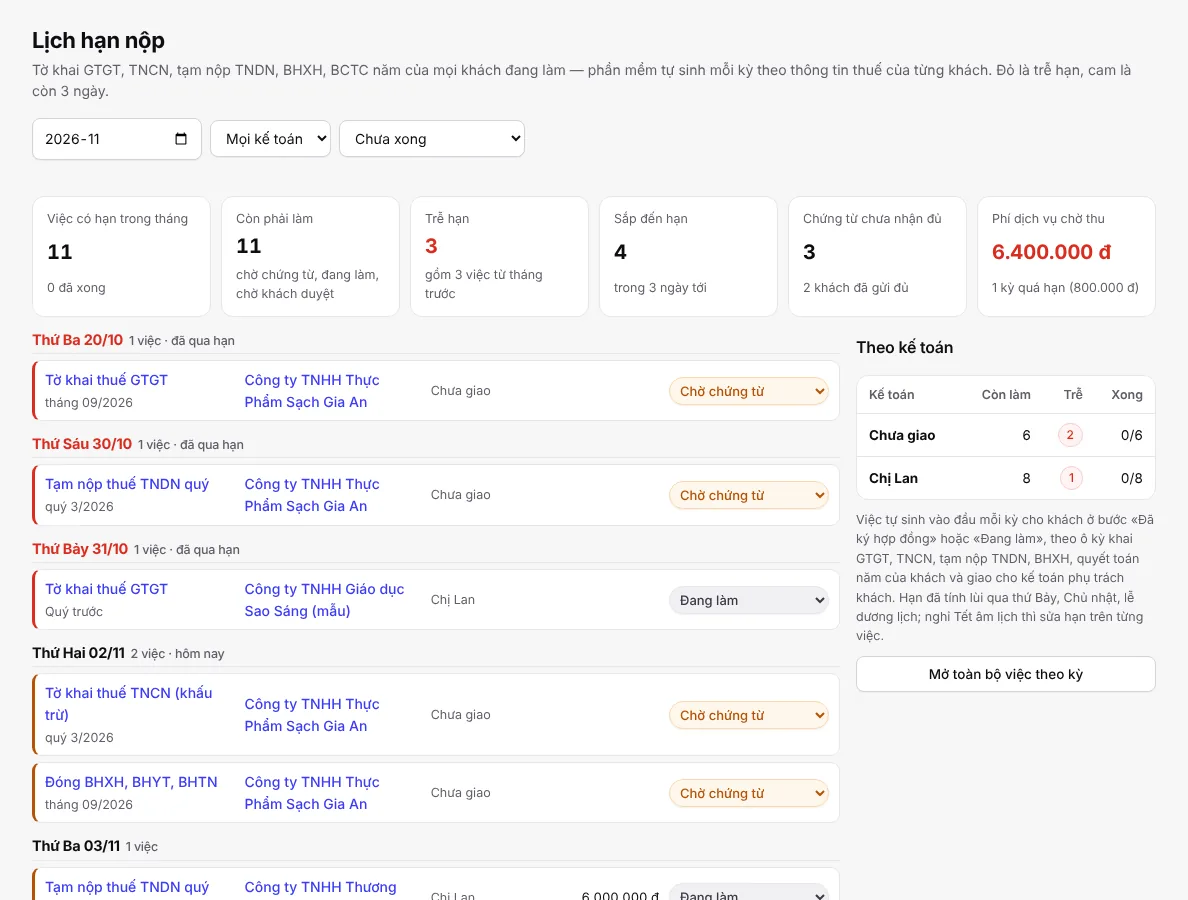
The Filing deadlines page gathers the whole firm's tasks by month:
- Overdue in red, 3 days left in orange, so you see at a glance what to do first.
- Filter by accountant: each person sees their own tasks, the owner sees the whole firm.
- Change status right in the row, without opening each task.
- Works on a phone: the same page, in a compact single column.

Documents, service fees and reminders
Monthly repetitive work that the software does itself or turns into tasks for the right person.
Monthly documents
- At the start of the month, the software emails clients a reminder to send their documents.
- Client sends late: creates a call task for the responsible accountant and sends a second email reminder.
- Client sends incomplete documents: creates a task to ask the client for the rest.
- 5 days before the deadline and the client has not sent documents: reminds the accountant.
Service fee
- Creates fees monthly, quarterly or yearly according to each client's package.
- Emails the fee notice to the client.
- Overdue fees switch to Overdue automatically, with a collection reminder.
- Unpaid for more than 15 days: notifies the manager.
Other reminders
- Digital signature or service contract expiring in 30 days.
- Overdue task: notifies the manager.
- Email asking the client to approve the figures before filing.
- Done: emails the client the tax amount payable.
Track by accountant, reports for the owner
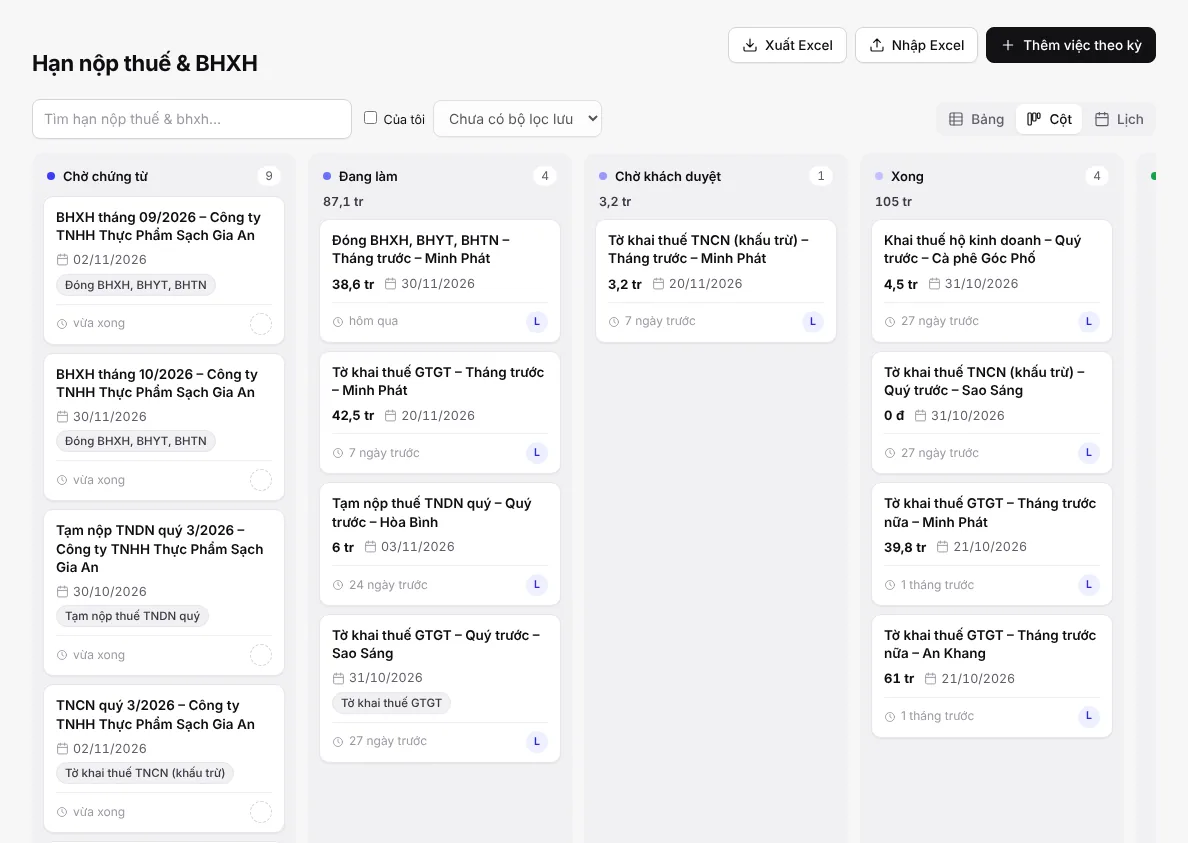
View tasks as a table, as columns by status, or as a calendar. Each task shows the client, period, deadline, amount and assignee.
Built-in reports
- Tasks per accountant: open, late, done
- Number of late filings
- Service fees collected per month
- Fees clients still owe
- Clients by service package
Printable documents and forms
- Accounting service contract (reference template; the firm reviews it before use)
- Service fee notice
- Document handover record
- Quote request form embedded on the firm's website; submissions land in the New inquiry stage
Get started in 3 steps
Sign up
Click Try the accounting firm template and sign in with Google or email.
Ready-made template
The firm's own software at name.salapp.vn is built in a few seconds from the Accounting and tax firm template, with sample data to click through. When done, remove the sample data with one button.
Add clients
Add clients one by one or click Import Excel to bring in the whole list. Set the filing period and responsible accountant, and the deadline schedule is created automatically.
Want to add a field, change a stage or rename a service package? Message the assistant in the software, for example: “Add a field for the document handover date” or “Rename the Quoted stage to Negotiating”.
Price
The same pricing as all SAL software, with no extra charge for the accounting template. Monthly prices, excluding 10% VAT. Yearly = price of 10 months.
Free
0 VND
No time limit
- 1 user
Basic
299,000 VND/month
Small firm
- 3 users
Professional
799,000 VND/month
Firm with several accountants
- 10 users
Business
1,990,000 VND/month
Large service company
- 30 users
Plans also differ in assistant credits, messaging channels and websites. See full pricing
No time to set it up yourself?
Setup package: SAL builds the software around how your firm works, within 48 hours (Sundays excluded), then hands it over and trains your whole team; 1 month of the Professional plan included. Price 2,990,000 VND, launch price 1,990,000 VND for the first 10 businesses, excluding VAT. See the steps
Frequently asked questions
Is the firm's client data safe?
Each firm has its own software at name.salapp.vn with its own database, not shared with other businesses. Role-based permissions can limit each accountant to the clients they handle. Sensitive fields are encrypted and every view is logged. The owner can download all data at any time.
Does the software store e-tax passwords?
No. The software does not store e-tax passwords or digital signature PINs. The client profile only has one sensitive field to note where the token is kept, for example which cabinet.
Does the software file returns on the firm's behalf?
No. The software manages tasks and deadline reminders. Accountants still prepare and file returns on the tax authority's system, then set the task to Done.
How are deadlines handled over Lunar New Year?
Deadlines falling on a Saturday, Sunday or the 1/1, 30/4, 1/5, 2/9 holidays move to the next working day automatically. Lunar New Year holidays and compensatory days off change every year and are not calculated yet: the firm edits the deadline on each task. When deadline regulations change, SAL - AI updates the template.
Can I import the client list from Excel?
Yes. The software has an Import Excel button to bring in the whole client list at once. Then set the filing period and responsible accountant for each client so the deadline schedule is created automatically.
What if the firm has several accountants?
Each client is assigned a responsible accountant, and each period's tasks go to that person. Filing deadlines can be filtered by accountant, and reports show how many tasks each person has left and how often they were late. Users per plan: Basic 3, Professional 10, Business 30; extra users 49,000 VND/user/month.
Does the trial cost anything?
No. The Free plan is 0 VND, with no time limit and no payment card, for 1 user. When several accountants need to use it together, upgrade to a paid plan right in the software.
Try the accounting firm template today
Once you sign up, the software is built from the template, with sample data to click through.