 SAL - AI
Insights / Troubleshooting
ChatGPT ads rejected: common reasons and how to fix them
SAL - AI · Updated: 07/10/2026
Every ChatGPT ad must pass OpenAI review before it is shown. When an ad is rejected, Ads Manager tells you the reason and gives two options: edit and resubmit, or request a review. This article is based on a real case and OpenAI support documentation.
Quick summary
- According to OpenAI documentation, ads may be rejected if they are misleading, inconsistent or contain prohibited content.
- A common reason for newcomers: the headline, description, image and landing page do not talk about the same thing.
- A landing page that blocks OpenAI crawlers also causes ads to be rejected or not delivered.
- You can edit and resubmit, or request a review if you believe there was a mistake.
Spotting a rejected ad
Go to Campaigns, select the Ads tab and look at the Status column. Three common statuses:
- Delivering: the ad is approved and being shown.
- Not approved: the ad did not pass policy review.
- Not delivering: the ad is not shown for one or more other reasons. Click the number next to it to see each reason.
The Overview page also shows a reminder card, “Resolve ad review or policy issues”, when an ad needs attention.
Reading the rejection notice
Click the Not approved status to open the detailed notice.
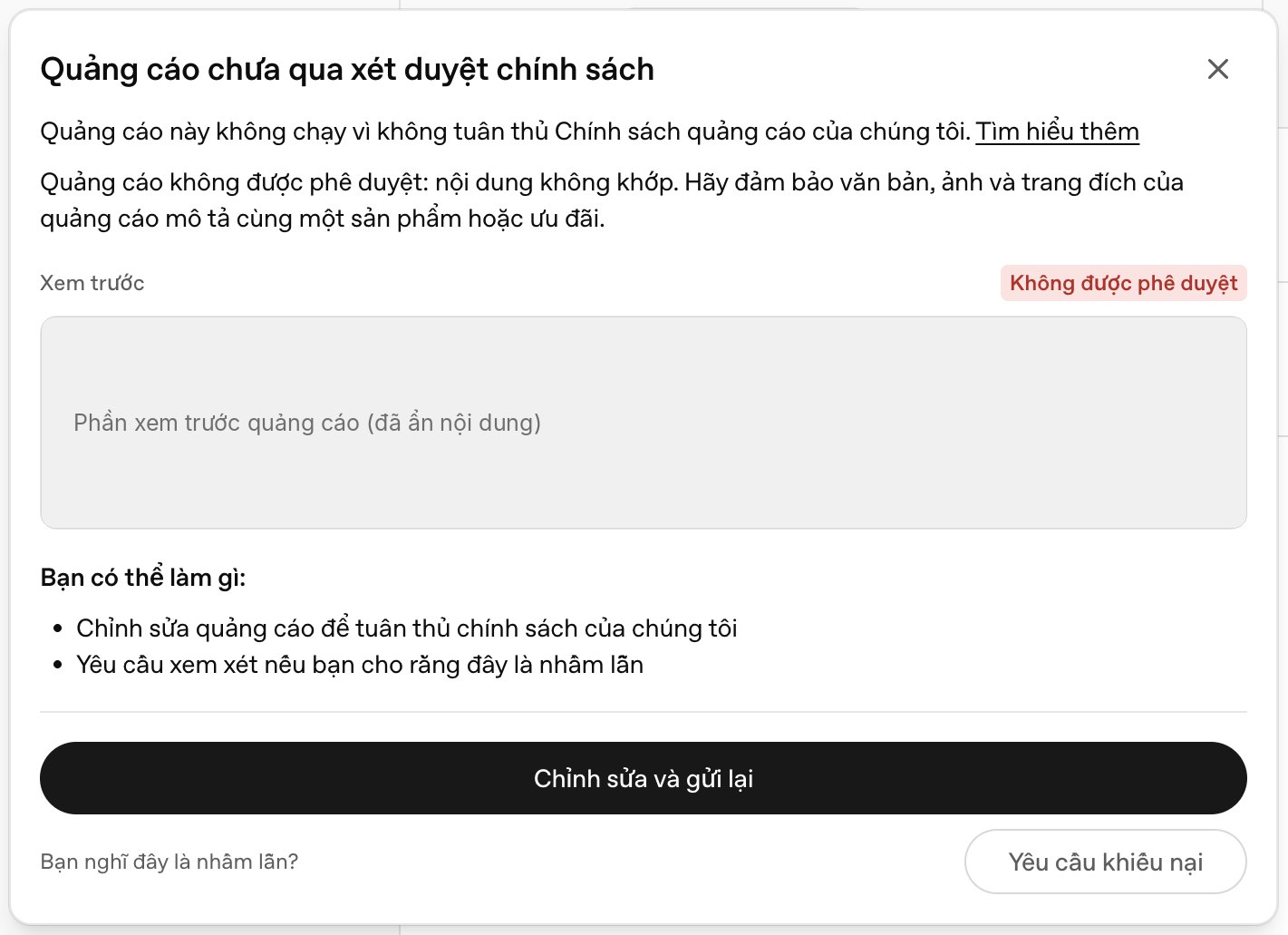
In this case, the reason was stated clearly: content mismatch, with a request to make sure the ad text, image and landing page describe the same product or offer.
Reason 1: Content mismatch
This is the easiest mistake to make when writing your own ads. The system compares three things: the ad text, the image and the landing page. If each says something different, the ad is considered inconsistent.
A typical example: a business sells advertising services for training centers, but the description is written as if inviting learners to find a course. Readers cannot tell whether the ad sells courses or services, and the landing page talks about services.
How to fix it:
- Write one sentence answering “what does this ad sell, and to whom”. The headline, description, image and landing page must all match that sentence.
- Use the same product name in all four places.
- If the ad mentions an offer, such as a free consultation, the landing page must show exactly that offer in an easy-to-see position.
- Link to the page about that specific product, not a generic home page.
Reason 2: Content policy violation
Ads and landing pages must comply with the OpenAI advertising policy. Some industries are restricted or not allowed, and misleading content is also rejected. See the list of industries in the article What are ChatGPT ads.
How to fix it: remove promises you cannot prove and absolute comparisons such as “best” or “number 1” without evidence, and make sure the landing page has no content from prohibited categories.
Reason 3: The landing page blocks OpenAI crawlers
OpenAI documentation requires landing pages to use valid URLs and not block OpenAI user agents, including OAI-AdsBot and OAI-SearchBot. If the system cannot read the landing page, it cannot check the content.
How to check:
- Open your website’s
robots.txtfile and make sure no line blocks these two names. - If your website uses a firewall or CDN service, check whether AI bot blocking features are turned on, as they may also block the ad crawler.
- Make sure the landing page opens normally, without requiring login and without faulty redirects.
Reason 4: Images do not meet requirements
According to the support documentation, uploaded images must be PNG or JPG, square and no larger than 1200 x 1200 px. Images with the wrong format or aspect ratio will not upload.
Edit and resubmit, or request a review?
- Edit and resubmit: choose this when you think the rejection reason is valid. Edit the content and submit, and the ad will be reviewed again.
- Request an appeal: choose this when you believe the system made a mistake. You need to write a short explanation.
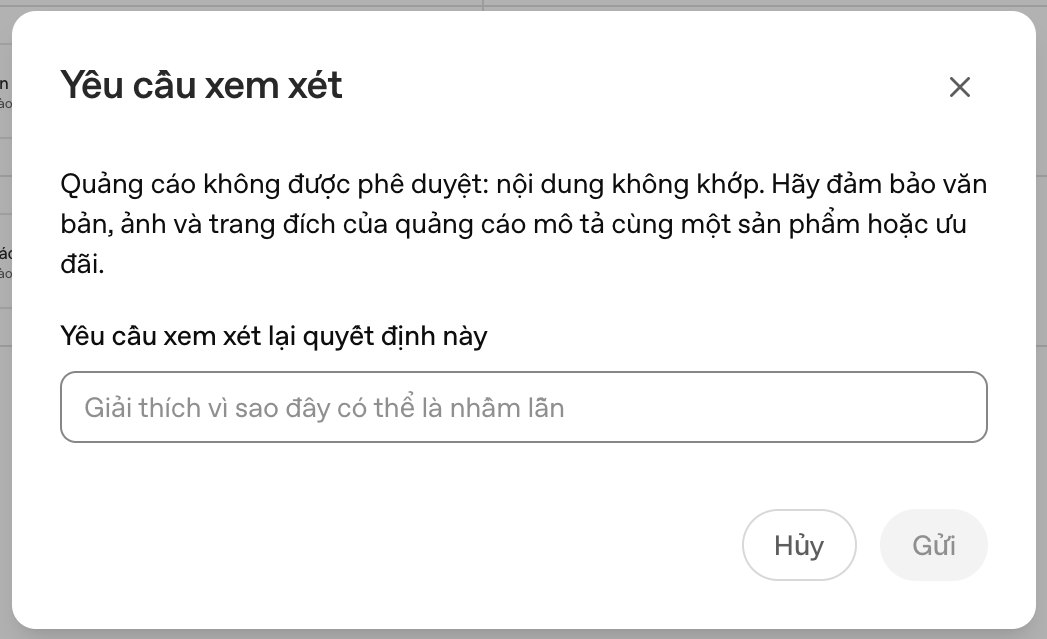
When writing a review request, state clearly: what the product actually is, which part of the landing page shows that, and why the ad text matches the page. If a similar ad of yours has already been approved, mention it.
In most cases, editing for clarity and resubmitting is faster and more reliable than appealing.
Ad approved but getting no impressions
This is a different problem from rejection. OpenAI documentation lists the causes: the campaign or ad is not turned on, review is not finished, it is outside the schedule, verification is not complete, the payment method is invalid, the budget is used up, or the bid is too low. For a new campaign, wait at least 24 hours before drawing conclusions.
Checklist before submitting for review
- The headline, description, image and landing page all talk about the same product, for the same audience.
- Any offer mentioned in the ad appears on the landing page.
- No unsupported promises or comparisons.
- The landing page opens and does not block
OAI-AdsBotorOAI-SearchBot. - Square image, PNG or JPG, no larger than 1200 x 1200 px.
- The industry is not in a restricted or prohibited category.
When you need help from OpenAI
If you have made fixes and the ad is still rejected without a clear reason, you can contact the OpenAI ads support team through the support tool in Ads Manager or by email at [email protected].
Sources
Images in this article were captured from the Ads Manager interface (Beta) in 10/2026, with the ad preview hidden. Policies and the interface may change.
Is your ad being rejected?
SAL - AI reviews your ad content, landing page and tracking before you submit for review. The first consultation is free.
See our ChatGPT ads service