 SAL - AI
Software for language, IT, skills and exam-prep centers
Training center management software,
from first enquiry to course completion.
SAL software comes with a ready-made template for training centers. Students move step by step from first enquiry, trial class and enrollment through to course completion; classes, teaching schedule, attendance, make-up classes and tuition in installments are all in one place. Tuition reminders, trial-class reminders and follow-up calls for absent students are created automatically for the right person.
Price: Free plan 0 VND, no time limit, no payment card. Paid plans from 299,000 VND/month, excluding VAT. See plans
The template comes with sample data to click through, removed with one button.
Where training centers usually get stuck
A center has dozens to hundreds of students, each with their own schedule and their own way of paying tuition. None of it is hard, but there is a lot of it and things slip.
Students enquire and nobody calls back
Messages sit in Facebook and Zalo, phone numbers are written in a notebook. After a trial class, nobody invites the student to enroll.
Tuition in installments, hard to remember who still owes
Every student pays differently: deposit, installment 1, installment 2. Nobody sends a reminder at the due date, and it all gets checked at month end.
Attendance on paper
Nobody follows up on absences, excused absences never get a make-up class, and remaining sessions in a package are counted by hand.
No clear view of who is doing well
The owner can hardly tell which advisor closes enrollments, which class has the most absences, or how many sessions each teacher has taught.
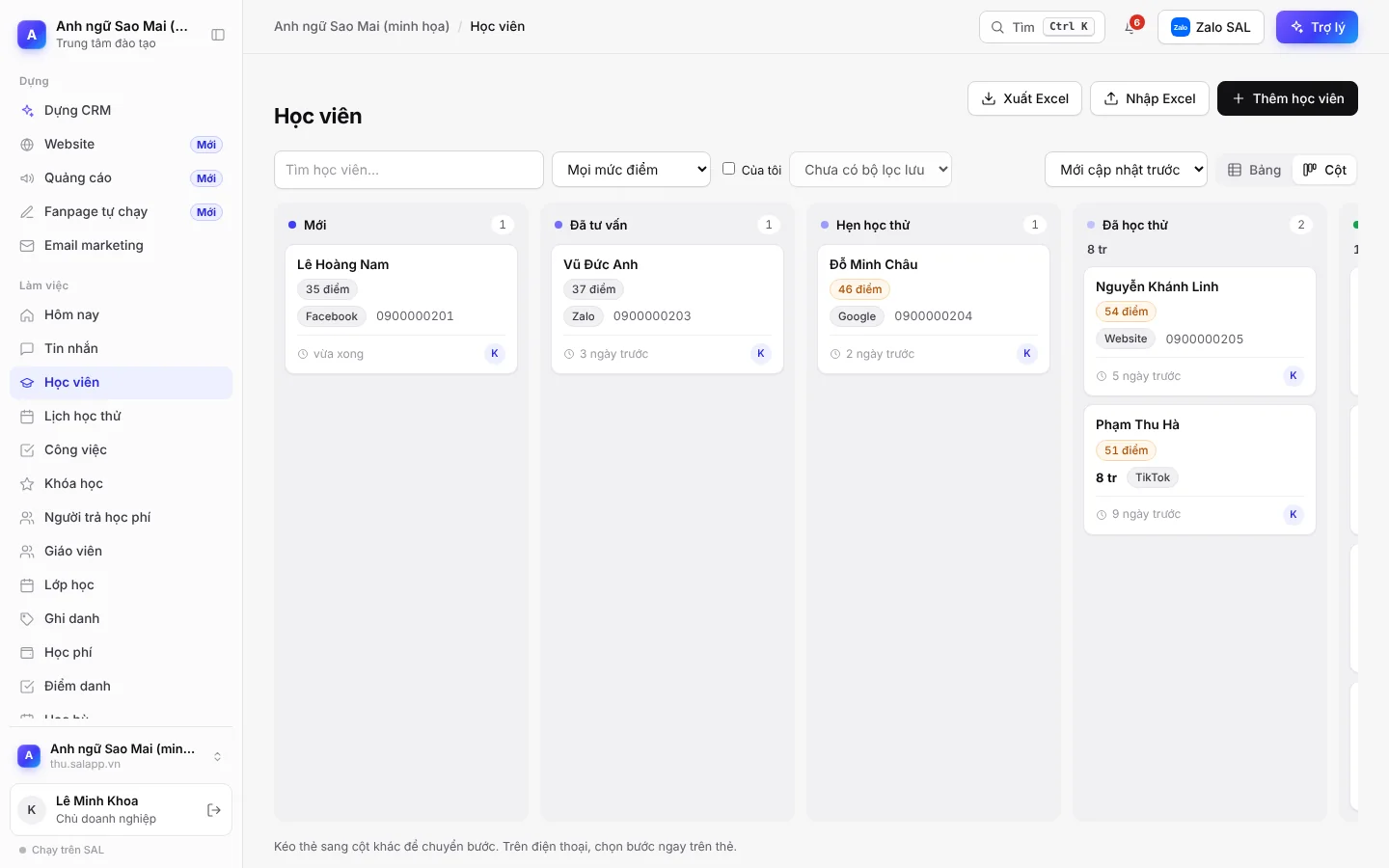
Students: from first enquiry to course completion
One profile per student. Anyone who fills in the Trial class sign-up form on your website automatically becomes a new student, with the right source recorded.
Student profile
- Student ID, year of birth, course of interest, branch
- Entry level, learning goal, preferred time slot
- The person paying tuition, when different from the student
- Source: Facebook, TikTok, Zalo, Google, website, referral
Trial classes
- A page where students book a trial class or a placement test themselves
- 1 day before a trial class: reminder email to the student, plus a task to call and confirm
- No-show for a trial class: create a task to call and rebook
- 3 days after a trial class without enrolling: create a call-back task
Students move through these steps:
- New
- Consulted
- Trial booked
- Trial done
- Studying
- Completed
There are also the steps Deferred and Not enrolling.
Classes, enrollment, attendance and make-up classes
Each class has a course, teacher, room, schedule and maximum size. The software works out the current size, remaining seats and the number of people waiting for a class.
Ghi danh
- Tuition, discount, amount due, amount paid and balance are calculated automatically
- Session packages are deducted automatically when attendance is taken
- Waiting for a class, deferral, class transfer
- End-of-course result, teacher's comments, certificate
Attendance
- Present, late, excused absence, unexcused absence
- Unexcused absence: create a follow-up call task and send a check-in email
- Excused absence: create a pending make-up session
- 3 sessions or fewer left: create a task to offer a renewal
Teaching schedule and teachers
- Timetable by class and by teacher
- Teacher timekeeping based on sessions taught
- Link to homework and materials for each session
- Teachers sign in and only see their own classes, with no amounts shown
Tuition in installments, with nobody who owes left out
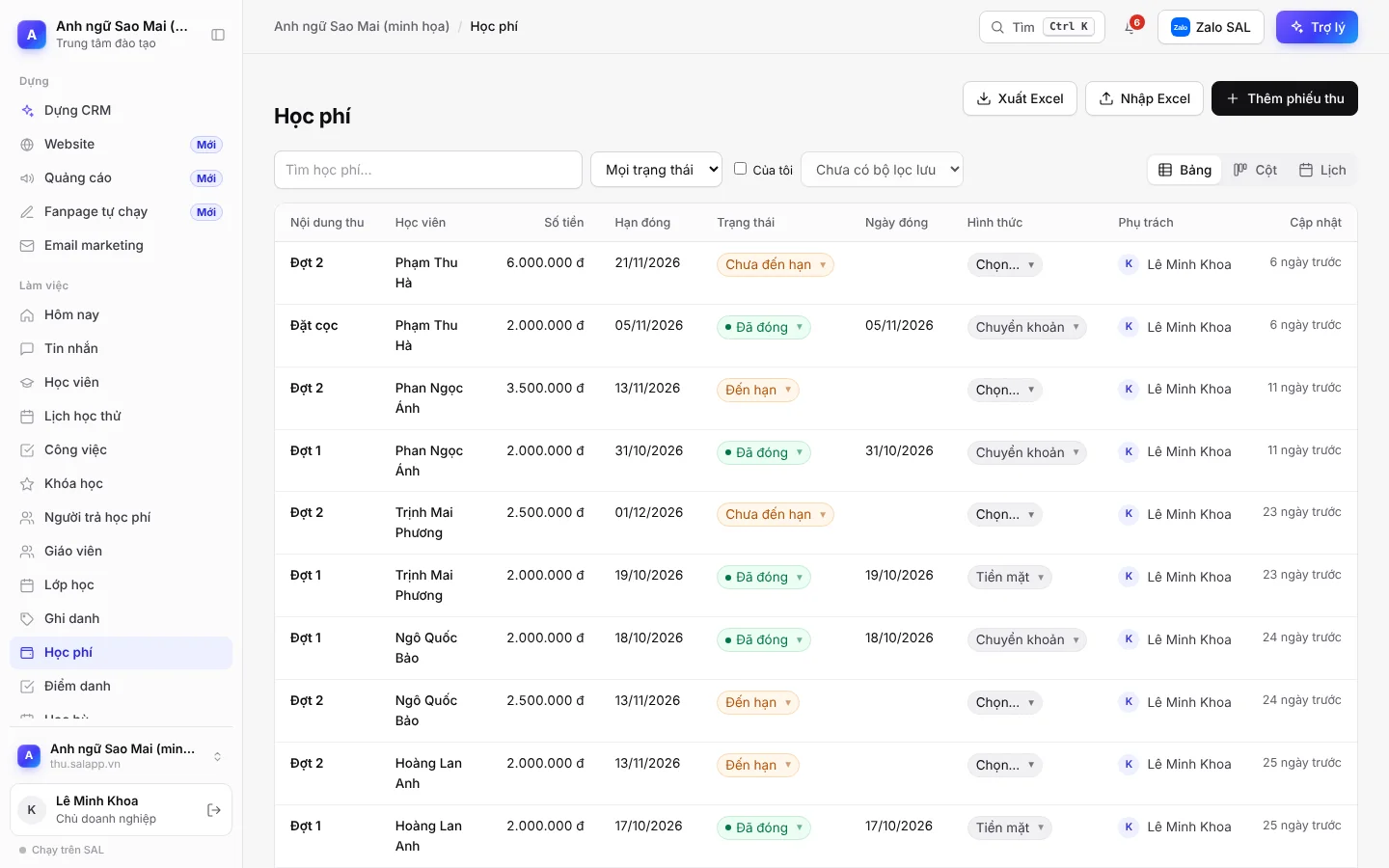
Each receipt records the student, installment, amount, due date and payment method. Amounts paid are added to the enrollment automatically and the balance is calculated for you.
What the software does at the due date
- Not yet due
- Due
- Overdue
- Paid
Each receipt changes status by itself according to its due date:
- 3 days before the due date: the receipt moves to Due, a reminder task is created and a reminder email goes to the student.
- 1 day overdue: the receipt moves to Overdue and the manager is notified.
- Print tuition receipts and enrollment forms from the data already there.
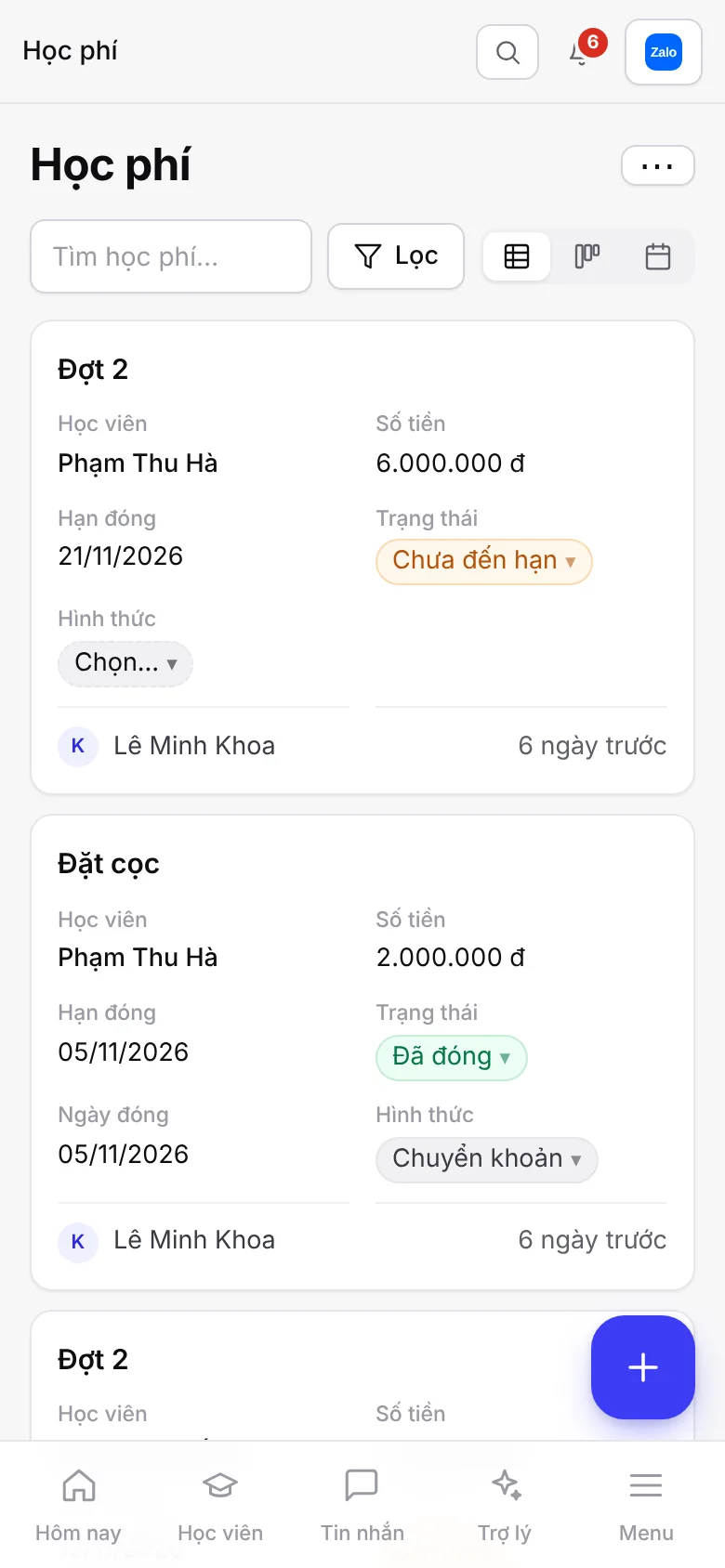
- Works on a phone: the same page, in a compact single column.
Automation, reports and KPIs
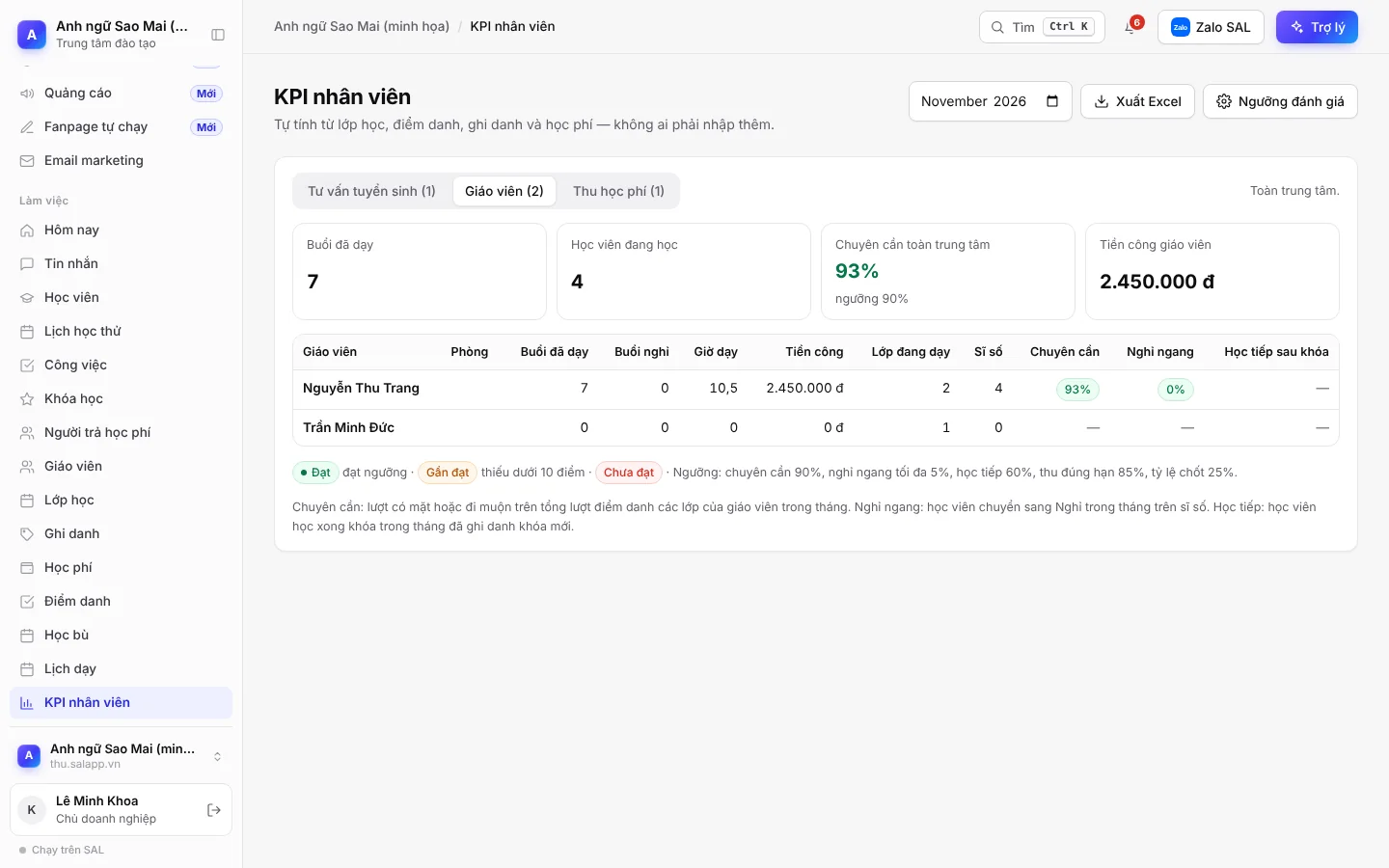
The template comes with more than 20 automations and more than 15 reports. To adapt them to the way your center works, just message the assistant.
Admissions
- New lead: automatically assigned to the advisor with the fewest leads
- New lead not contacted after 2 hours: notify the advisor
- 5 days after consulting with no trial class booked: create a call-back task
- Student joins a class: welcome email with their student ID
Student retention
- 14 days before a class ends: create a task to invite students to the next course
- 7 days before a deferral ends: create a task to call and invite the student back to class
- Course completed: create a task to ask for feedback and invite the student to continue or refer a friend
- 1 day before a make-up class: remind the student
Built-in reports
- New students by source and by advisor
- Tuition collected by month, outstanding and overdue
- Enrollment revenue by course
- Unexcused absences by class, pending make-up sessions
- Teaching pay and number of sessions by teacher
Students sign up, book and check things themselves
The template comes with four pages for students. The center sends the link or embeds it on its website.
Trial class sign-up
A form embedded on your website. Whoever fills it in becomes a new student, with the source recorded as Website.
Trial class booking
Students pick a time for a trial class or a placement test themselves.
Tuition lookup
Look up enrollment and tuition with the enrollment ID and phone number.
Student portal
Enter the student ID and phone number to see the class schedule, homework, attendance, comments and tuition.
Get started in 3 steps
Sign up
Click Try the training center template and sign in with Google or email.
Ready-made template
Your center's own software at name.salapp.vn is set up in seconds from the Training center template, with sample data to click through. When you're done looking, remove the sample data with one button.
Import students, open classes
Add students one by one, or click Import Excel to bring in the whole list. Open a class, enroll students, take attendance for the first session and create tuition receipts with due dates.
Want to rename a course, add a branch, add a field or change a step? Message the assistant in the software, for example: “Add a field for the parent's phone number” or “Rename the step Trial booked to Placement test booked”. If your center works very differently from the template, see how to build your own management software with AI. There is a step-by-step video guide on YouTube (12 minutes, in Vietnamese, sample center).
Price
The same pricing as all SAL software, with no extra charge for the training center template. Monthly prices, excluding 10% VAT. Yearly = price of 10 months.
Free
0 VND
No time limit
- 1 user
Basic
299,000 VND/month
Small center
- 3 users
Professional
799,000 VND/month
Center with many classes
- 10 users
Business
1,990,000 VND/month
Center with several branches
- 30 users
Plans also differ in assistant credits, messaging channels and websites. See full pricing
No time to set it up yourself?
Setup package: SAL builds the software around how your centre works, within 48 hours (Sundays excluded), then hands it over and trains your whole team; 1 month of the Professional plan included. Price 2,990,000 VND, launch price 1,990,000 VND for the first 10 businesses, excluding VAT. See the steps
Frequently asked questions
Which kinds of centers is this software for?
The template is built for language, IT, skills and exam-prep centers: class-based teaching with enrollment, tuition in installments and attendance. Course names, branches, steps and fields can all be changed by messaging the assistant.
How do I manage tuition paid in several installments?
Each installment is a receipt with a due date. 3 days before the due date, the software moves the receipt to Due, creates a reminder task and sends a reminder email to the student. 1 day overdue, it moves to Overdue and the manager is notified. The amount paid and the balance of each enrollment are calculated automatically.
What does the software do when a student is absent?
Unexcused absence: the software creates a follow-up call task and sends a check-in email to the student. Excused absence: it creates a pending make-up session to be scheduled; the student is reminded 1 day before the make-up class.
Can teachers see students' tuition?
No. People with the Teacher role only see the classes they teach, the teaching schedule, the students in their classes, attendance and make-up classes; they do not see amounts or reports.
Can students check their schedule and tuition themselves?
Yes. In the Student portal, students enter their student ID and phone number to see the class schedule, homework, attendance, comments and tuition. The student ID is included in the welcome email sent when the student joins a class.
Can I import my student list from Excel?
Yes. The Students section has an Import Excel button to bring in the whole list at once, and an Export Excel button to download it.
What if the center has many advisors and many teachers?
New students are automatically assigned to the advisor with the fewest leads, and each class is assigned one teacher. The Staff KPI page calculates results for three groups: admissions advisors, teachers and tuition collection. Users per plan: Basic 3, Professional 10, Business 30; extra users are 49,000 VND/user/month.
Is student data safe?
Each center has its own software at name.salapp.vn with its own database, never shared with other businesses. Permissions are role-based; sensitive fields are encrypted and every view is logged. The center owner can download all data at any time.
Does the trial cost anything?
No. The Free plan is 0 VND, with no time limit and no payment card needed, for 1 user. When the center needs several people working together, upgrade to a paid plan right inside the software.
Try the training center template today
Once you sign up, the software is built from the template, with sample data to click through.