 SAL - AI
SAL software · built by describing
Build your own management software with AI,
no coding needed.
SAL software by SAL - AI gives each business its own management software at name.salapp.vn. You describe how you work in Vietnamese, and the assistant builds the sections, fields, workflows and reminders exactly that way. You preview first; the software only changes when you click Apply.
Price: Free plan 0 VND, no time limit, no payment card, 50 AI credits in the first month. Paid plans from 299,000 VND/month, excluding VAT. See plans
What is SAL software
SAL software is a no-code platform for building management software, developed and operated by SAL - AI in Hanoi. Owners of shops, offices, training centers or sales teams describe what they need in plain words; the assistant builds the software from that description, instead of hiring developers or dragging and dropping every table yourself.
Separate for each business
Each business gets its own software at name.salapp.vn with its own database, never shared with other businesses.
Built with words, in Vietnamese
You describe how you work, and the assistant builds the sections, fields and workflows exactly that way, using your own terms.
Preview before anything changes
Changes are proposed for you to preview. Each applied change is saved as a version, and you can go back to an older one.
Start from 0 VND
The Free plan has no time limit. Paid plans start at 299,000 VND/month, excluding 10% VAT.
How it works: 3 steps
Describe it in words
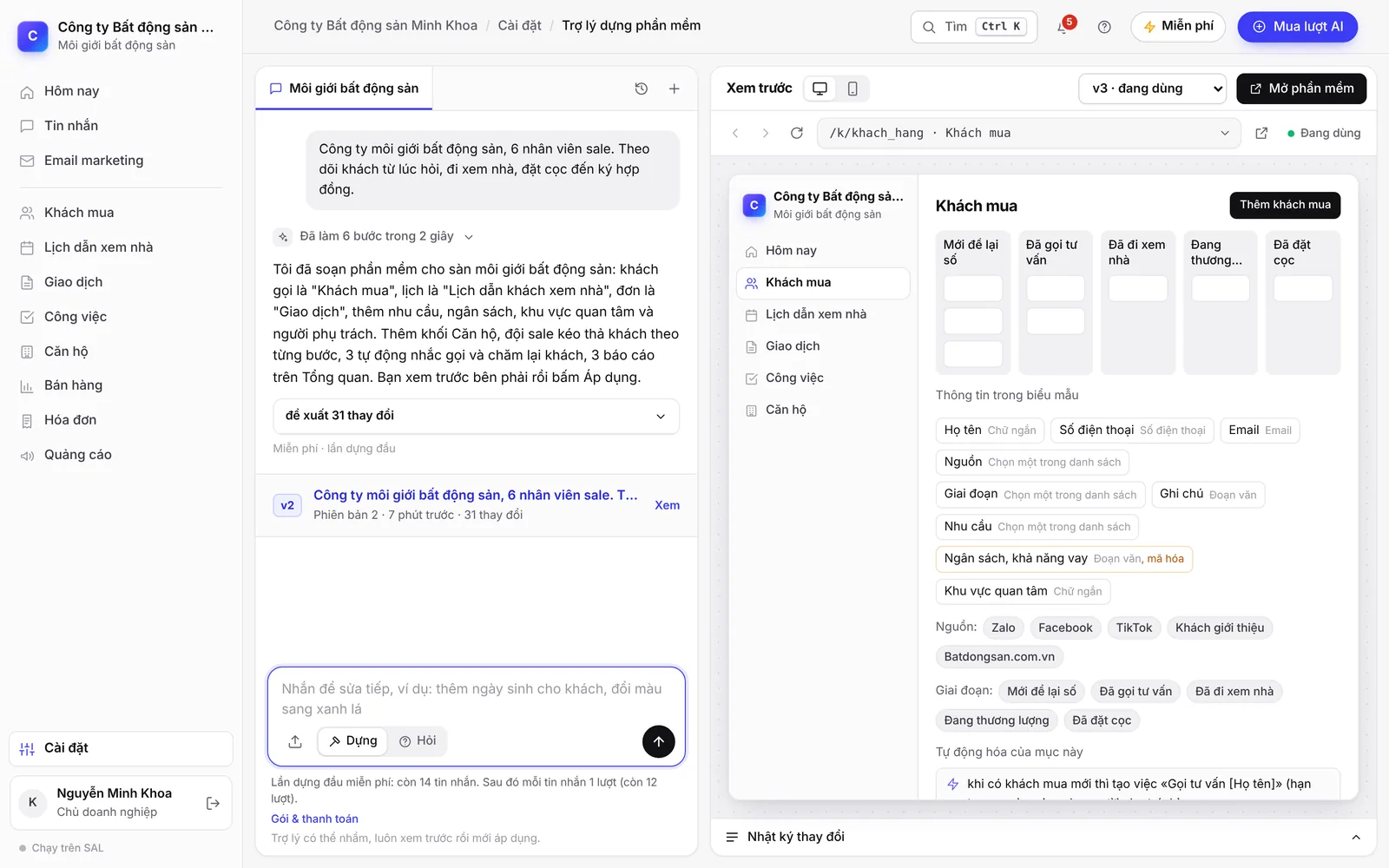
Tell the assistant what your business does and what you need to track. The example in the screenshot above: “Real estate brokerage, 6 sales staff. Track customers from first enquiry, property viewing and deposit through to signing the contract.”
Preview, then click Apply
The assistant proposes the sections, fields, steps, reminders and reports. The preview appears right alongside; if you like it, click Apply.
Use it and keep editing
Add staff, import your customer list from Excel, turn on integrations. When something needs to change, just send another message, for example “add a deposit step for home buyers” or “remind me to call customers back after 3 days”.
The Free plan has 50 AI credits in the first month, then 15 credits a month from the second month. Credits follow the actual AI usage: each message building or editing the CRM usually uses about 8–27 credits, shown right under the answer; when credits run out, the software keeps working as usual. While building, only the configuration (names, fields, options) is sent to the assistant; customer data is not.
What you can build
Everything below can be added and edited by messaging the assistant.
Sections and fields
- Sections named your way: customers, students, orders, projects…
- Fields, options, and links between sections
- Customer stages, with drag and drop to move between stages
- Customer profile: appointments, to-dos and transactions in one place
Reminders and automation
- New customer nobody has contacted yet: notify the staff member in charge
- Customer idle for many days: create a call-back task
- Before an appointment or a payment due date: create a task or send a reminder email
- Scheduled customer-care email sequences
Reports, documents and forms
- Reports by lead source, by staff member, by month
- Printable document templates: receipts, contracts, handover records
- Lead capture forms for your website, Facebook and Zalo
- Pages where customers book appointments or look up their records themselves
The same software also includes a shared inbox, role-based permissions, payments, shipping and e-invoices. The list of integrations and the status of each one is on the Connect page; an overview is on the Products page.
Don't want to start from a blank page? Use an industry template
The software comes with 8 templates. Each one is set up in seconds, uses no credits, and includes sample data to click through. After setup you can still message the assistant to adapt it to the way you work.
Training center
Students from first enquiry to course completion, classes, enrollment, tuition in installments, attendance, teaching schedule.
Clinic
Appointments by doctor, treatment plans and quotes, payments in installments, post-treatment care.
Spa and beauty
Appointments by technician, treatment packages counted per session, prepaid cards, inviting customers back.
Multi-marketplace online shop
COD order confirmation, failed deliveries, returns, profit and loss by marketplace, complaints, after-sales care.
Accounting and tax firm
Filing deadlines generated each period for every client, reminders for clients to send documents, recurring service fees.
Interior design and build
Site survey, quote, contract; projects with milestone payments, a photo log and warranty.
Real estate: agencies and brokers
Round-robin lead assignment, projects and inventory, viewing schedule, deposits, payment schedule, commissions.
Business CRM (any industry)
Customers, contacts, opportunities, drag-and-drop pipeline, quotes, orders, contracts, customer care.
The templates are offered while your software is still empty. If there is no template for your industry, describe it in words and the assistant builds from your description.
Compared with other options
The table below compares approaches, not specific product names. Each approach suits a different situation.
| How it works | Getting a first version | When the way you work changes |
|---|---|---|
| Hiring a team to write custom software | First version: Describe the requirements to a development team, wait for the build and acceptance | When it changes: Every change means another quote and another wait |
| Drag-and-drop (no-code) tools | First version: Build each table and field yourself; takes time to learn the tool | When it changes: You can change it yourself if someone knows the tool well |
| Packaged industry software | First version: Usable right away if the built-in process matches how you work | When it changes: Changes within what the vendor allows |
| SAL software | First version: Pick an industry template or describe it in words for the assistant to build | When it changes: Message the assistant, preview, click Apply; you can go back to an older version |
- SAL software suits shops, offices, training centers and sales teams that need to track customers, appointments, orders and tasks their own way.
- It is not yet a fit if you need full accounting software (general ledger, financial statements, tax return filing): the Accounting section in SAL shows monthly income, expenses, estimated profit and receivables and payables, but does not replace accounting software. Multi-warehouse stock and a unified ERP are in development.
- The software runs in the browser and works on both computers and phones.
The data belongs to your business
The software is built with words, but the data is still kept separate and access-controlled like any regular management software.
Separate and access-controlled
- A separate database for each business
- Role-based access: owner, manager, staff, accountant, view-only (plus teacher when there are classes); staff only see the customers they handle
- Sensitive fields are encrypted, and every view is logged
- Data on every plan is backed up daily
You stay in control
- The business owner can download all data at any time
- SAL staff can only get in when you grant time-limited access
- While building, only the configuration is sent to the assistant; customer data is not
- When a paid plan expires, the software moves to the Free plan and your data stays intact
Price
One price list for every feature of SAL software. Monthly prices, excluding 10% VAT. Yearly = price of 10 months.
Free
0 VND
No time limit
- 1 user
- 50 AI credits in the first month
- 15 credits a month from the second month
Basic
299,000 VND/month
For shops and small teams
- 3 users
- 100 AI credits per month
Professional
799,000 VND/month
For growing sales teams
- 10 users
- 300 AI credits per month
Business
1,990,000 VND/month
For multiple departments
- 30 users
- 1,000 AI credits per month
AI credits follow the actual AI usage: each message building or editing the software usually uses about 8–27 credits; when credits run out, the software keeps working as usual. Extra users are 49,000 VND/user/month. See full pricing
No time to build it yourself?
Setup package: SAL builds the software around how your business works, within 48 hours (Sundays excluded), then hands it over and trains your whole team; 1 month of the Professional plan included. Price 2,990,000 VND, launch price 1,990,000 VND for the first 10 businesses, excluding VAT. See the steps
Frequently asked questions
Can I build management software myself without knowing how to code?
Yes. You describe in Vietnamese what your business does and what you need to track, and the assistant builds the sections, fields, workflows and reminders. You preview and then click Apply, with no code to write.
How long does it take to build management software with AI?
Industry templates are set up in seconds and include sample data to click through. Building from your own description depends on the level of detail: the assistant asks how you work and then makes a proposal, which you preview and apply.
How much does SAL software cost?
The Free plan is 0 VND with no time limit, 1 user and 50 AI credits in the first month, then 15 credits a month. Basic is 299,000 VND/month (3 users), Professional 799,000 VND/month (10 users), Business 1,990,000 VND/month (30 users). Prices exclude 10% VAT; paying yearly costs the same as 10 months.
What if the assistant builds something I didn't mean?
The assistant can misunderstand, which is why every change goes through a preview step. If it isn't right, send another message to fix it. Even after applying, you can go back to the previous version.
When building the software, is customer data sent to the assistant?
No. While building, only the configuration (names, fields, options) is sent to the assistant; customer data is not. Each business has its own database, and the business owner can download all data at any time.
How is SAL software different from drag-and-drop (no-code) tools?
With drag-and-drop tools, you build each table and field yourself. With SAL software, you describe it in words, the assistant builds it, and you preview before applying. The software also comes with a shared inbox, payments, shipping, e-invoices and integrations used in Vietnam such as Zalo OA, VietQR, GHN and GHTK.
Which industries is SAL software for?
There are ready-made templates for training centers, clinics, spa and beauty businesses, online shops, accounting and tax firms, interior design, real estate, and a general CRM template for any industry. For other industries, describe it in words and the assistant builds from your description.
What happens to my data if I stop using it later?
The business owner can download all data at any time. When a paid plan expires, the software automatically moves to the Free plan and your data stays intact.
What is salapp.vn, and does it belong to SAL - AI?
Yes. salapp.vn is the address of the SAL - AI software: each business has its own SAL software at name.salapp.vn. SAL - AI is the company name, the SAL software is the product (some people call it “salapp” for short), and sal-ai.vn is the website with the introduction, pricing and guides.
Start with one sentence
Type what you need to manage, sign in with Google or an email code, and the assistant builds it right inside your software.