Google Ads ›

Search ads

Google Search ads: keywords, match types, ads and bidding.

Search ads show when someone types exactly their need into Google. This article explains how to choose keywords, the three match types, how to write ads, how to choose a bidding strategy, and why keywords can get "low search volume".

Article by SAL - AI · Updated 10/2026

Start in the SAL software

Describe what you need and the assistant plans your Google ads.

Sign in with Google or a code sent by email, and the assistant drafts the plan right in your software (Ads → Assign tasks): keywords, ad copy, suggested budget. Connect Google Ads in the Ads section: sign in with Google and pick the account; ads only run once you agree.

Build a Google ads plan

The Free plan has 50 AI credits in the first month. Want SAL - AI to do it? Have SAL - AI do it.

Ads that answer exactly what users are searching for.

You choose keywords related to your product. When a user searches a matching phrase, Google runs an auction: position and cost per click depend on your bid and ad quality (ad relevance, expected click-through and landing page experience). You only pay when someone clicks.

  • Broad match: shows for queries related in meaning too; the widest reach.
  • Phrase match ("keyword"): queries that include the meaning of the phrase.
  • Exact match [keyword]: queries with the same meaning; the narrowest reach.
  • Negative keywords: exclude irrelevant queries such as "free" or "jobs".

Responsive search ads let you enter up to 15 headlines and 4 descriptions; Google combines them into many versions and learns which ones perform.

When to use it.

Customers actively searching for the product

People search for your service on Google every day.

Time-sensitive services

Repairs, bookings, consulting: customers need it right when they search.

Want clear measurement per keyword

Know exactly which search terms bring customers.

What needs to be done.

Keyword research

Use Keyword Planner to see search volume and reference prices; group by intent.

Write ads

Headlines with the main keyword, benefits and a call to action; add assets such as sitelinks, callouts and phone number.

Bidding and monitoring

Start with a strategy that fits the amount of data; review the search terms report weekly to add negative keywords.

Deployment steps.

  1. Conversion tracking. Install the Google tag and conversions before running
  2. Structure. Campaigns and ad groups by theme, with matching keywords and ads
  3. Test run. Moderate budget, monitor actual search terms
  4. Optimize. Add negative keywords, split out performing groups, move to automated bidding once there is enough data

Common mistakes.

  • Using only broad match without negative keywords. Money is spent on irrelevant queries.
  • Choosing keywords that are too new or too narrow. Google reports "low search volume" and does not show them. Common in new fields; add more common phrasings that users actually type.
  • Every keyword leads to the homepage. A landing page that does not match the keyword lowers quality and raises costs.
  • Choosing "Maximize clicks" without a bid limit. You may pay a high price for each click.
  • No conversion tracking. You do not know which keywords bring customers.

Who should use it, and who shouldn't yet.

Local and professional services

Law, accounting, repairs, dentistry, training.

B2B businesses

Customers search for specific solutions before getting in touch.

Stores with frequently searched products

Combine with Shopping ads.

Not a good fit when: almost no one searches for your product on Google (a completely new product that needs demand created first), or you do not yet have a suitable landing page.

What the cost includes.

Management fee, if you hire an agency

Custom quote based on the number of campaigns and management period.

Ad budget

Decided by you, paid directly to Google through your Google Ads account. This is separate from the service fee.

Google Ads policies and features change often. We check against the current rules before rolling out for each business.

Real screenshots

Creating a real search campaign, step by step.

From choosing the goal, locations, keywords, bidding and ads, to when the campaign runs and Google reports low search volume keywords.

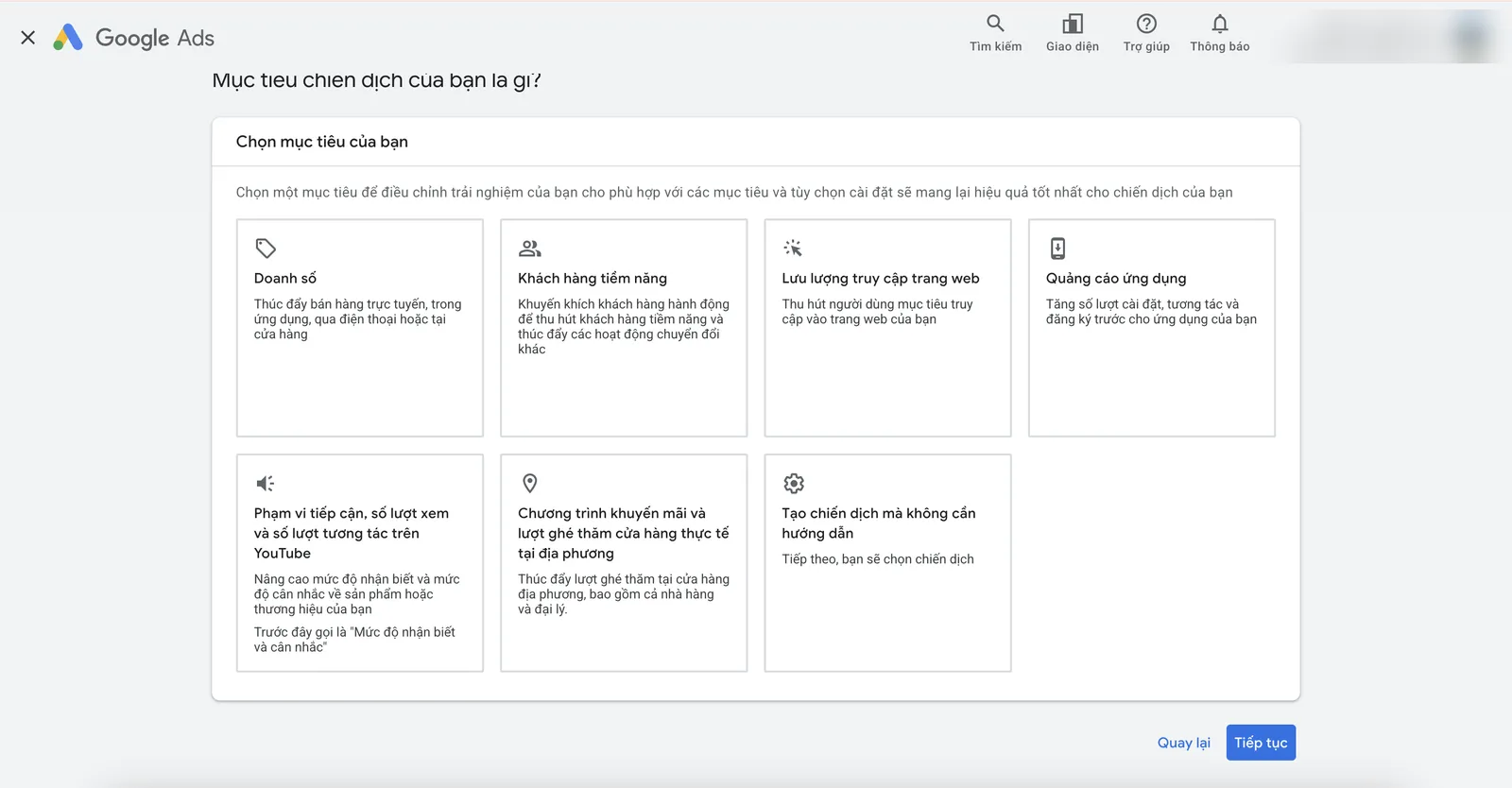
The first step when creating a campaign: choose a goal such as sales, leads, website traffic or store visits.
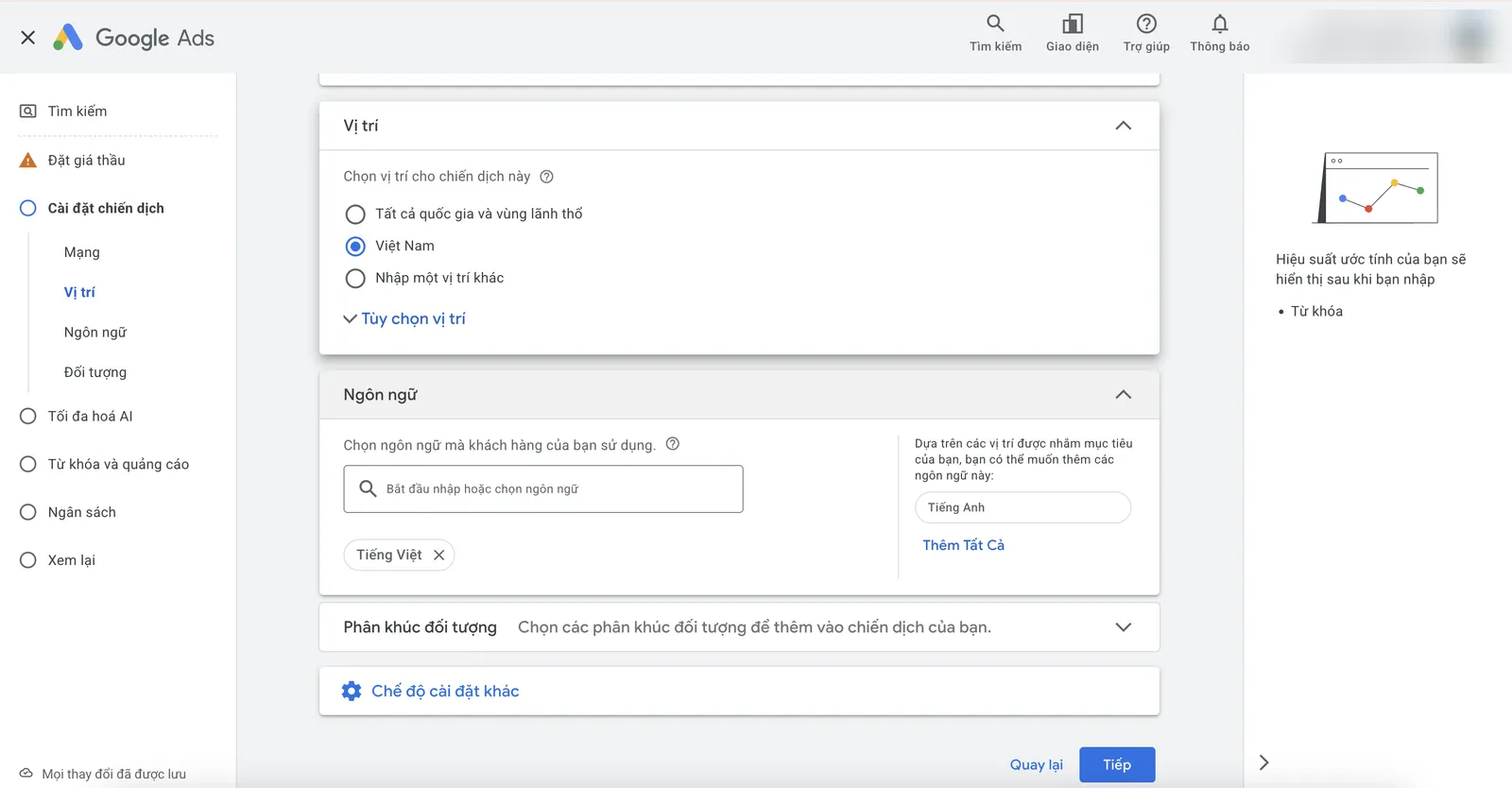
Choose the location and language of the people who see the ads.
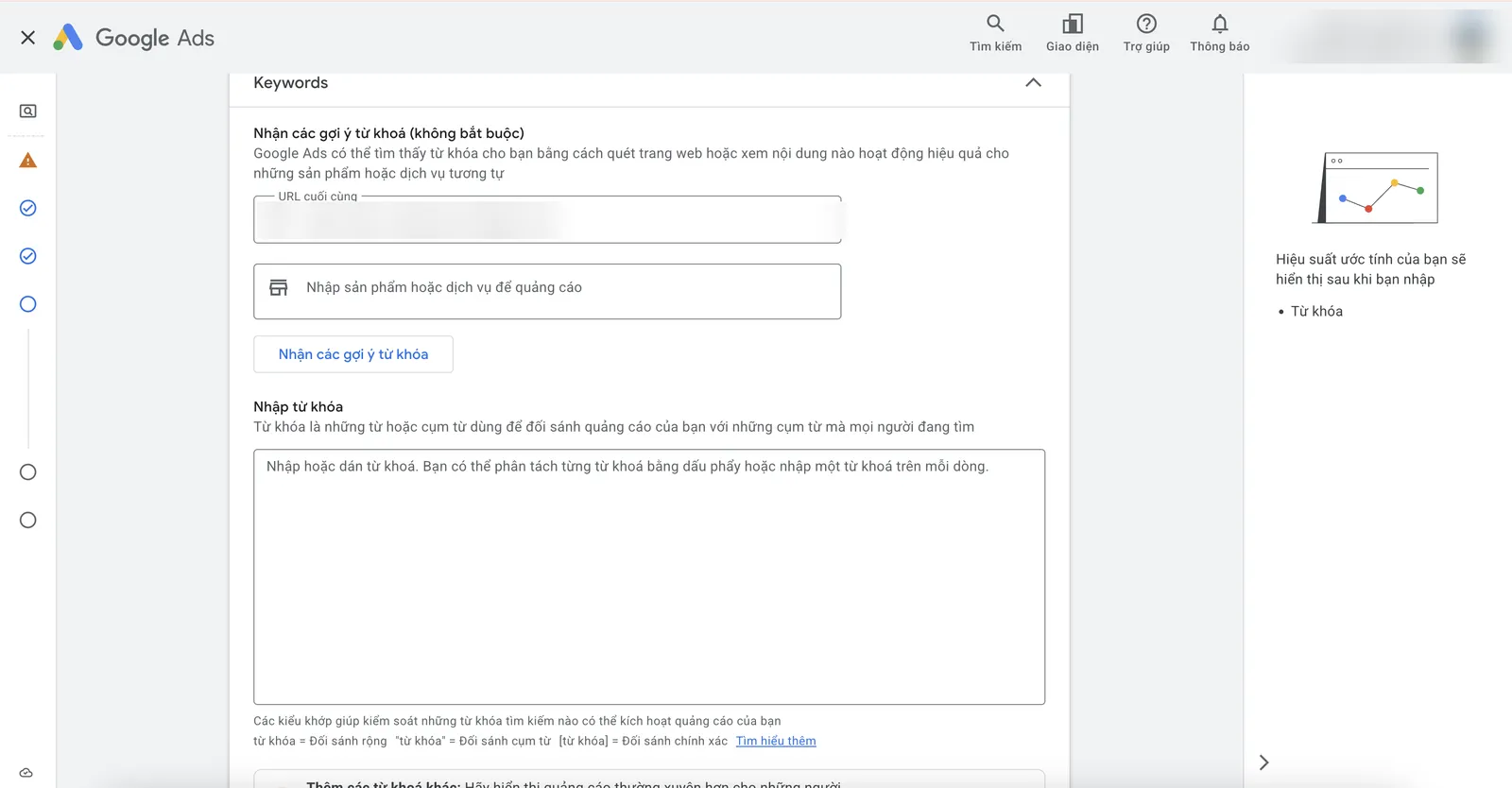
Enter keywords: you can let Google suggest them from the landing page, with notes on the match types.
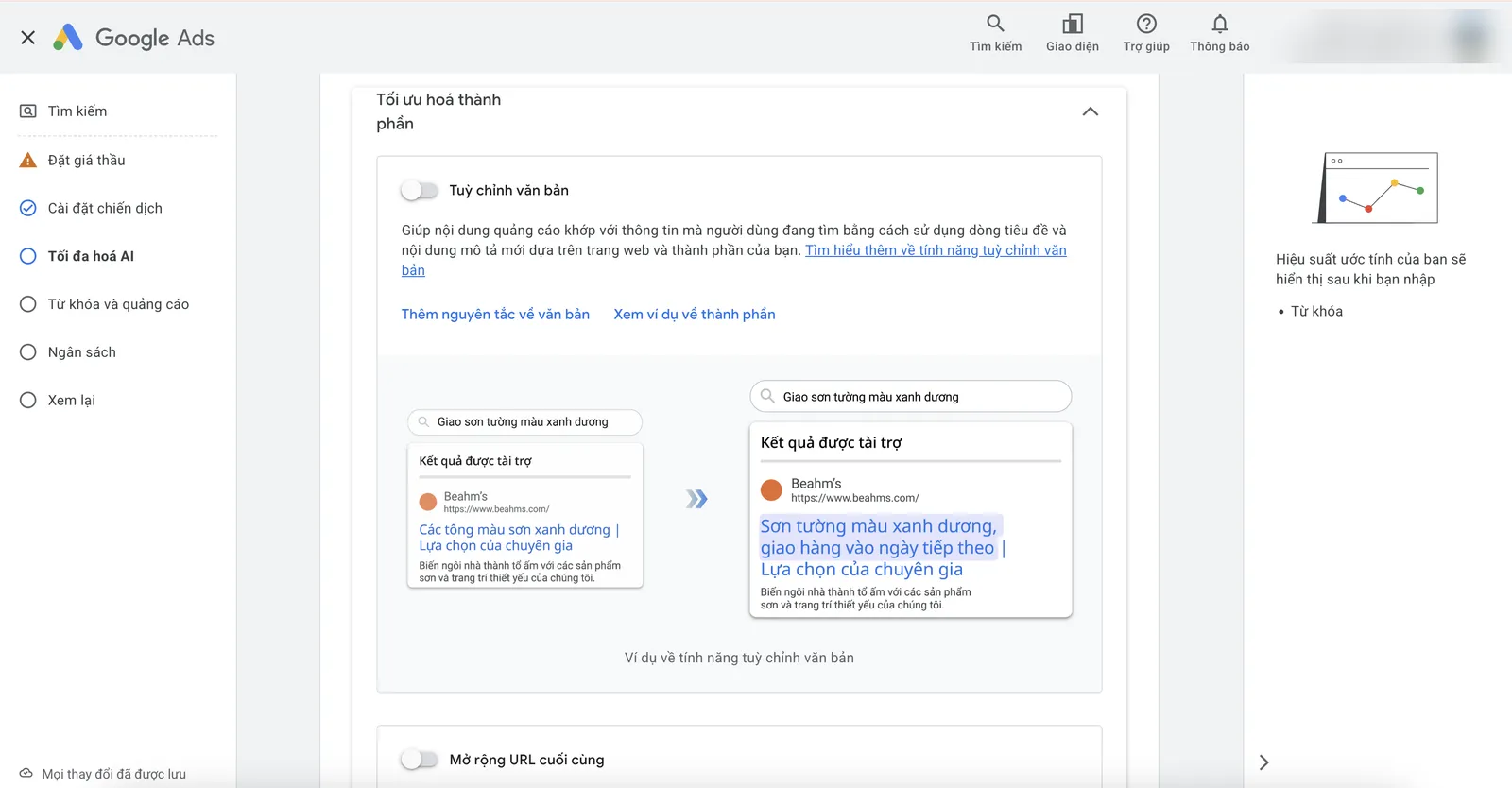
AI optimization options for search campaigns: Google adjusts ad content to the query automatically.
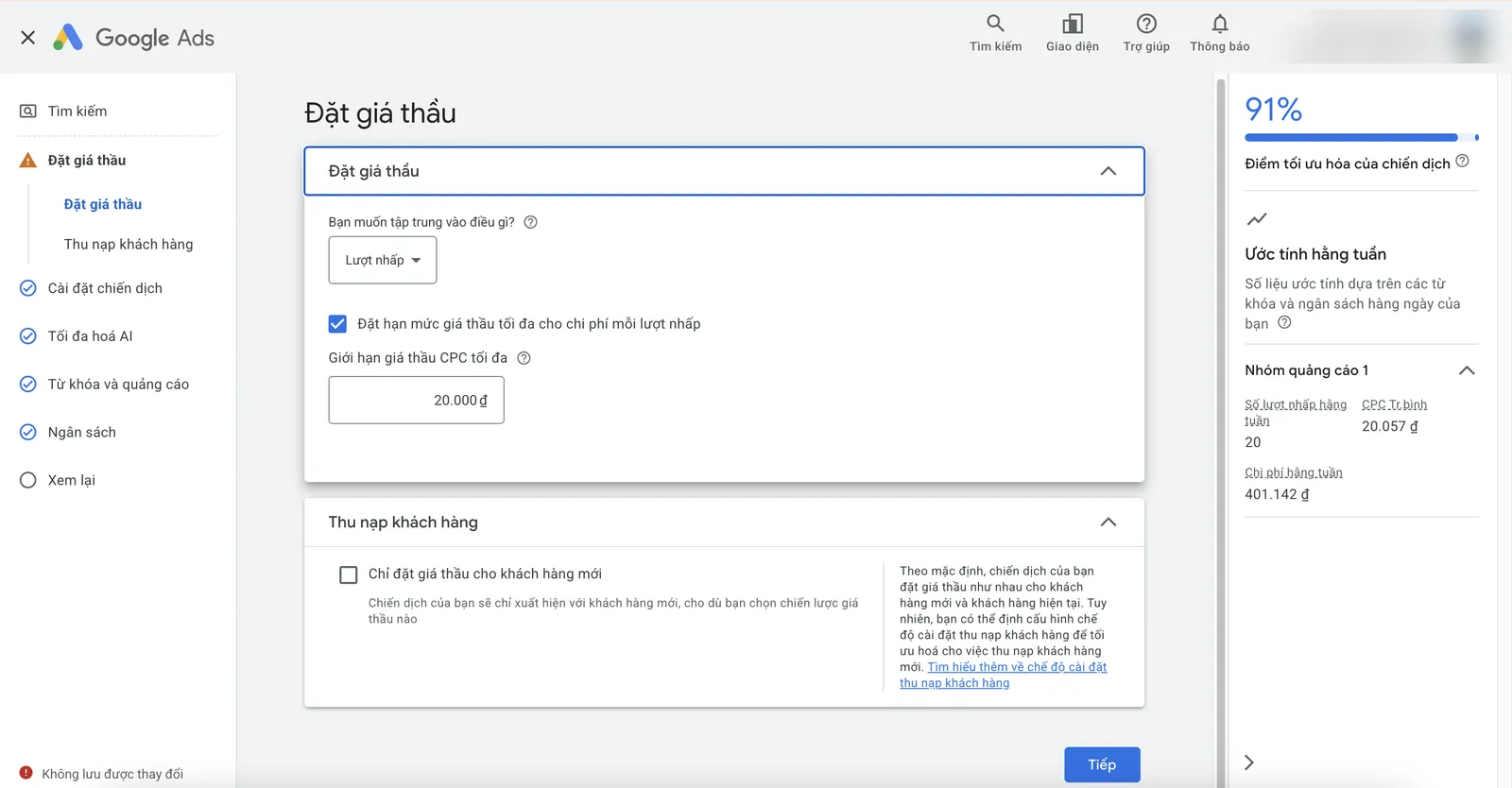
Setting Maximize clicks bidding with a maximum cost-per-click limit.
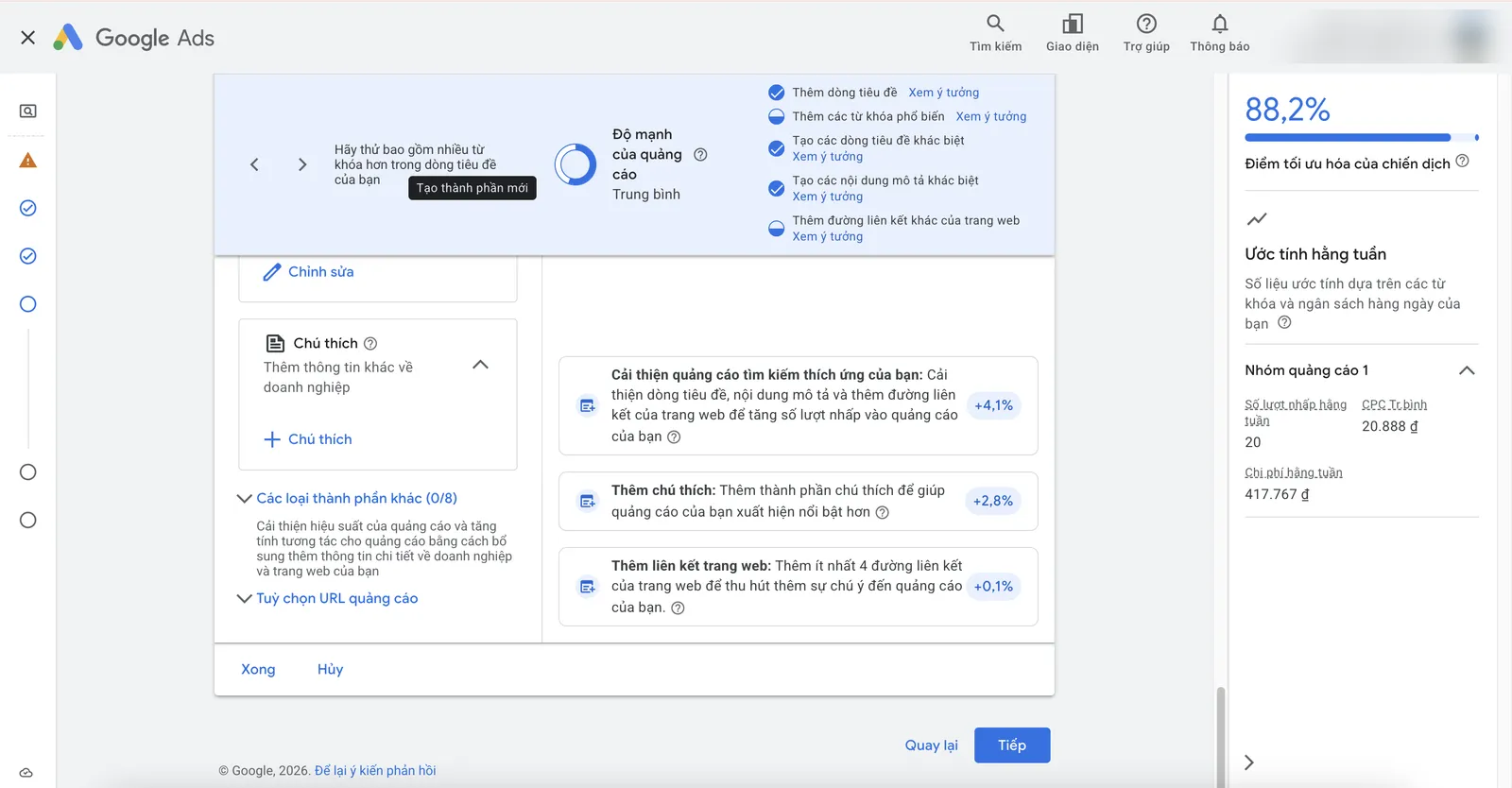
Ad strength and suggestions to add headlines, callouts and sitelinks for improvement.
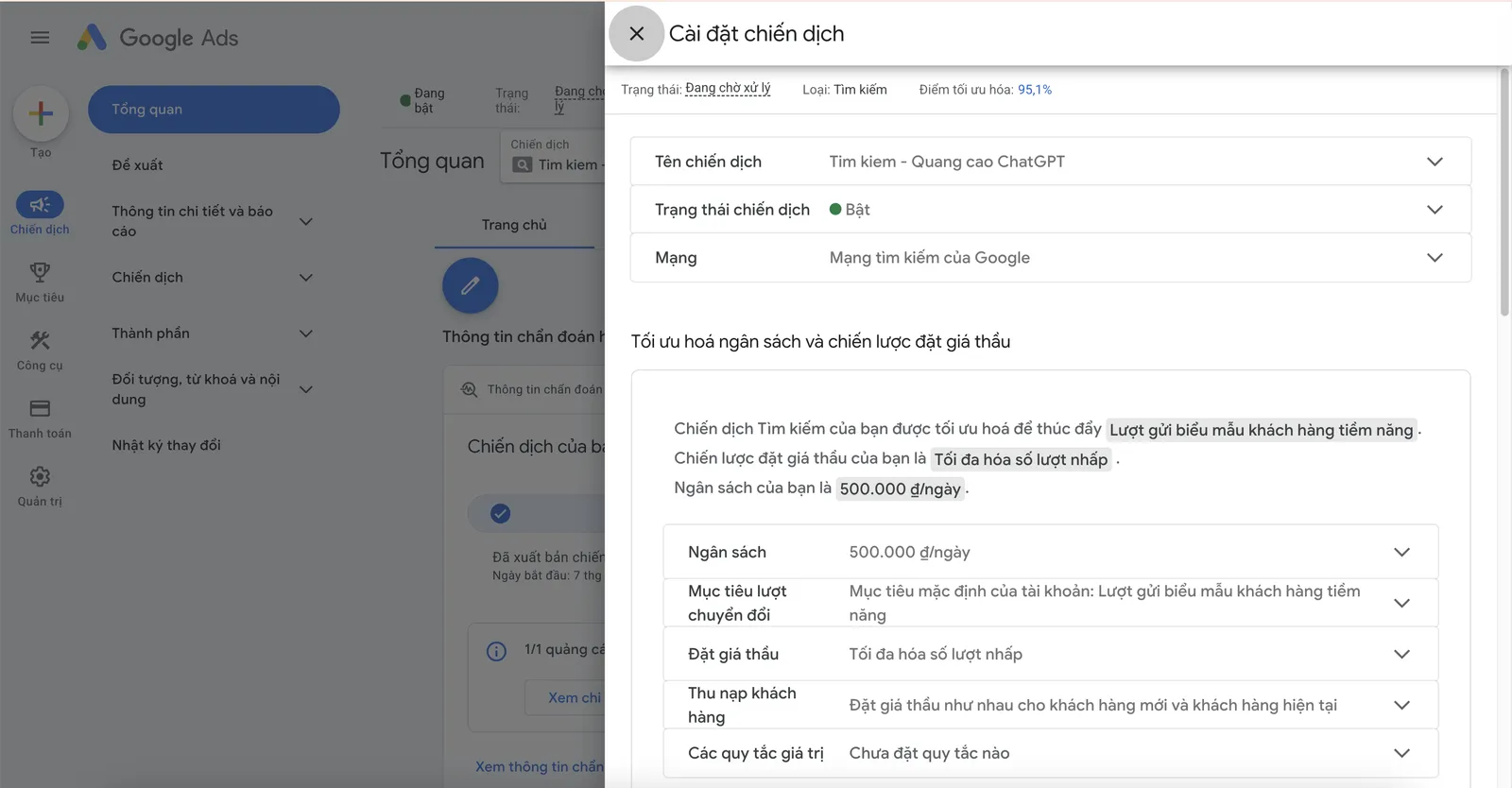
Campaign settings summary: Search Network, daily budget, conversion goals and bidding strategy.
Keywords with status
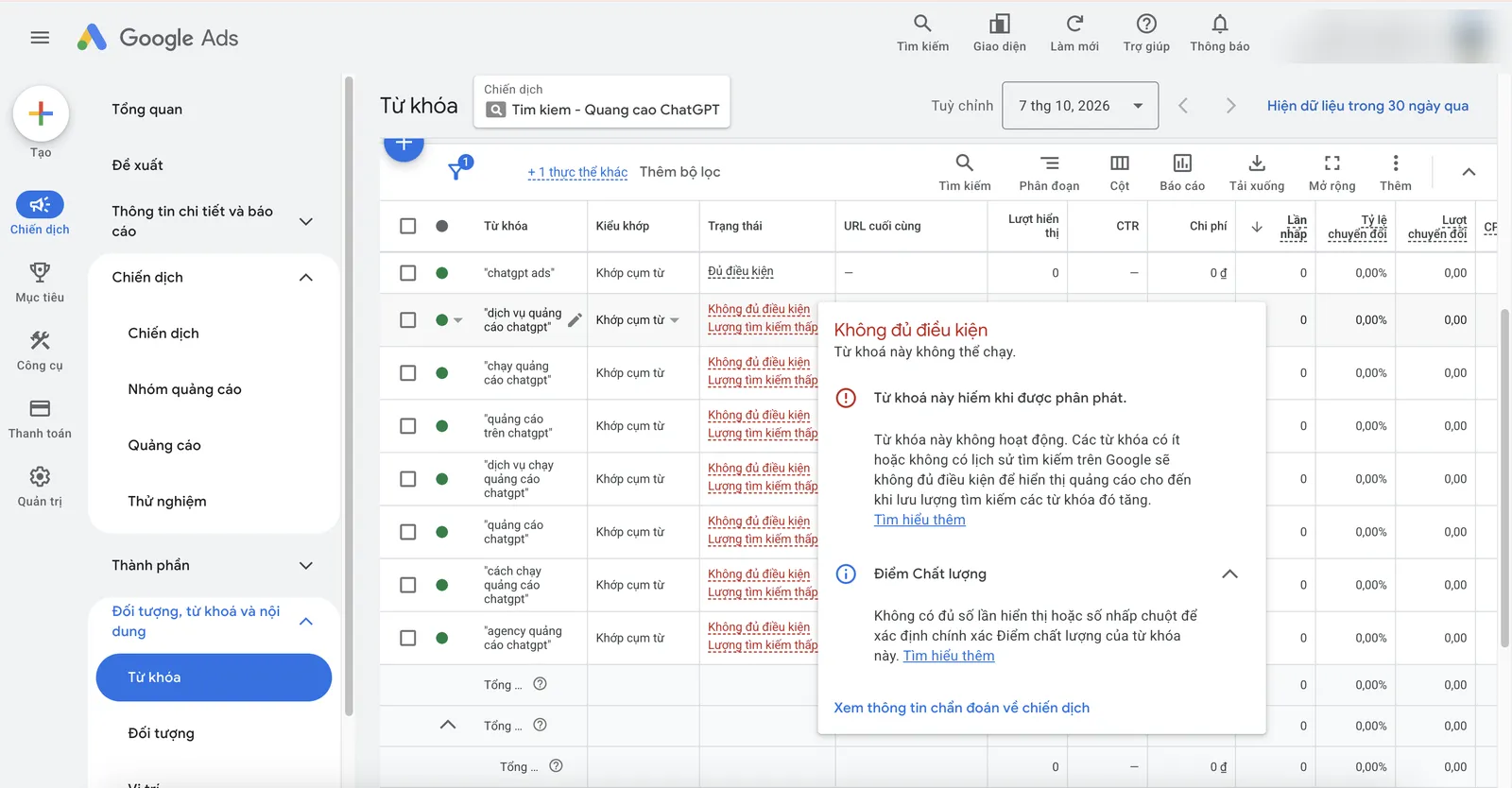
Keywords with status "low search volume": not enough people searching, so they cannot show yet.
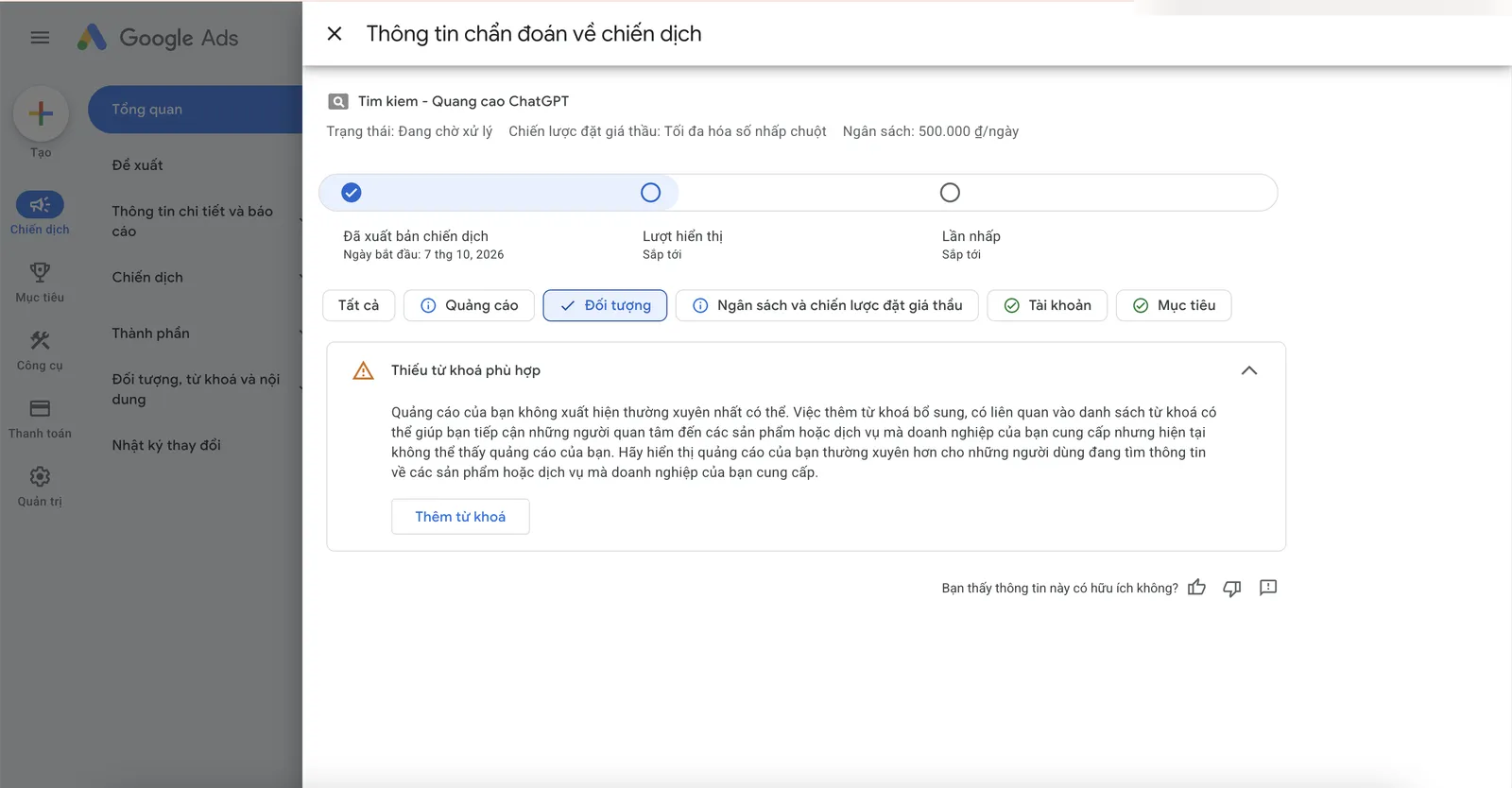
Campaign diagnostics: Google warns about a lack of suitable keywords.

Screenshots from a Google Ads account we operate directly. Account IDs, emails, domains, tag IDs and names have been hidden. Click an image to view it full size.

FAQ

Frequently asked questions

How long does ad approval take?

Usually within one business day; some cases take longer, especially for new accounts or accounts under verification.

Why are there impressions but few clicks?

Usually because the ads do not closely match the queries or their position is low. Check the search terms report and ad strength.

Which bidding strategy should I choose?

Without conversion data, you can start with Maximize clicks with a bid limit; once conversions are steady, switch to Maximize conversions or target CPA.

Can I get to the top of Google?

Ads can appear at the top of the results page, but the position depends on each auction. This is different from organic ranking (SEO).

Need someone to work with you?

Let SAL - AI work with you.

SAL - AI handles search ads with you, on an account in your business's name, with a budget you approve. Tell us about your current situation and we will call you back to advise.

Keyword lists by intent group.
Ads with complete assets.
A negative keyword list.
Weekly conversion-based reports.

Read more:

Do it yourself in the SAL software: the Advertising section → Assign tasks drafts the plan and expected cost for this channel; leads from ads land in the Customers section, with reports in the same place. The Free plan has no time limit. Open the software →
Or contact us directly:
Message on Zalo
Ask us for advice

By sending this request, you agree that we may contact you about the above. See our Privacy policy.

Your request has been received.

Thank you. We will contact you to schedule a consultation.

About SAL - AI

How we work: transparent from the start.

SAL - AI is operated by SAL Media Service Development and Investment Company Limited (tax code 0110454937), the company behind the SAL software platform (a private management software for each business), which also takes on advertising and website work at published prices.

We commit through how we work, not through promises: a clear scope from the start, a budget you approve, accounts and website in your name, numbers you can check yourself, and for Google ads and websites a 100% refund of service fees if we have not started work.