 SAL - AI
Customer management software (CRM) for any industry
CRM software for small businesses,
built around the way you sell.
SAL software comes with a CRM template that works for any sales or service business: customers, contacts, sales opportunities, quotes, orders, contracts and customer care in one place, in your own software at name.salapp.vn. To change a step, add a field or add a reminder, just message the assistant.
Price: Free plan 0 VND, no time limit, no payment card. Paid plans from 299,000 VND/month, excluding VAT. See plans
After signing in, pick the Business CRM (any industry) template or the template for your industry; templates come with sample data to click through, removed with one button.
Where small businesses usually get stuck
Customers come from many channels, several people look after them, and each person keeps notes their own way. None of it is hard, but there is a lot of it and things slip.
Customers live in each person's phone
Customer numbers and Zalo messages sit on each employee's phone. When someone leaves, the history with those customers leaves too.
Customers enquire and nobody calls back
Customers leave their number on the website, on Facebook or at a trade fair, but nobody picks it up. Someone calls a few days later.
No idea which deals are about to close
The owner does not know how many opportunities there are this month, what they are worth, or which ones are stuck at the quote stage.
Quotes and contracts scattered everywhere
Quotes in Word, contracts in email, renewal dates on a paper calendar. Nobody remembers until the deadline.
Customers and contacts
Each customer is a company, a household business or an individual, with a customer tier, a lead source and a person in charge. One customer company can have several contacts.
Customer profile
- Customer type, tax ID, industry, company size, customer tier, segment
- Source: website, Facebook, Zalo, Google, TikTok, trade fair, referral…
- Hot, warm and cold lead scores so you know who to call first
- Call, message on Zalo or send email right from the profile; a log of calls, messages, meetings and emails for each customer
Contacts
- Several people at one customer company: job title, department, Zalo, birthday
- Buying role: decision maker, influencer, initiator, user…
- No duplicates: when you add a customer whose phone number or email already exists, the software asks first
- Import your whole customer list from Excel
Clients move through these stages:
- New lead
- Contacting
- Qualified
- Customer
There are also the steps Inactive and Not a fit (with a reason). A new lead nobody has picked up is assigned automatically to the salesperson with the fewest leads, with a task to call within 2 hours; if nobody has contacted them after 1 day, the manager is notified.
Sales opportunities and quotes
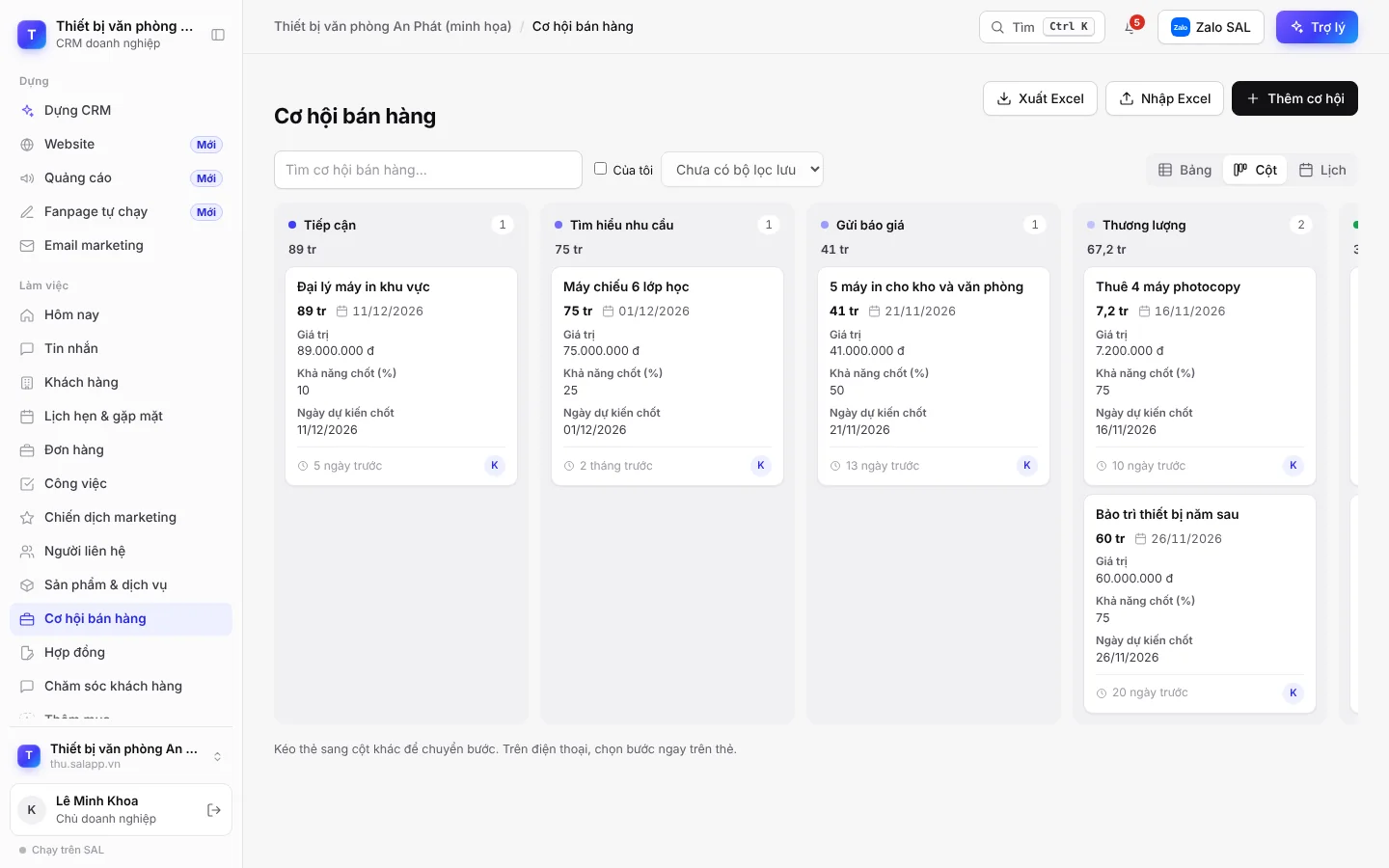
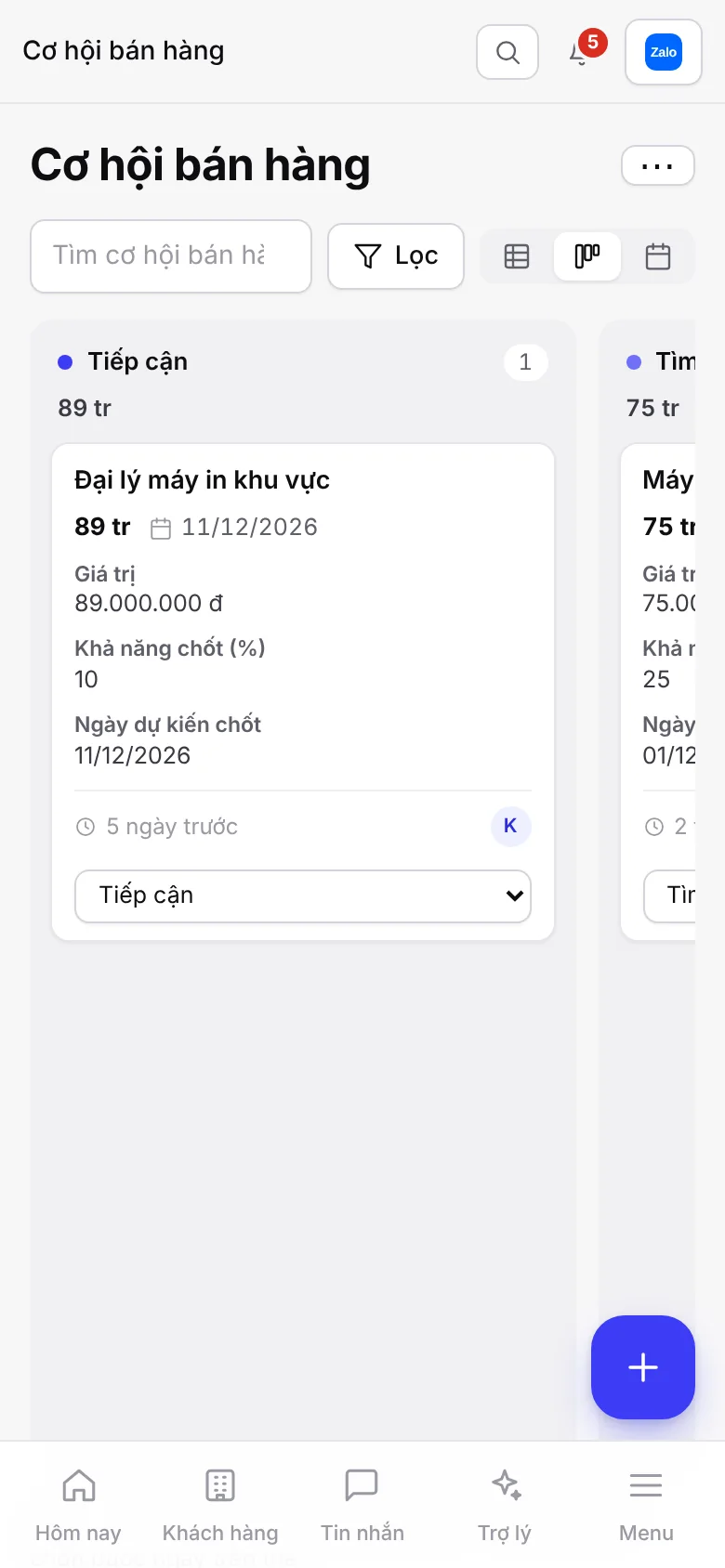
Each opportunity records the customer, product or service, value, win probability and expected close date. Drag the card through each stage; the software sets the win probability and calculates the forecast value.
From first approach to closing
- Approach
- Discovery
- Quote sent
- Negotiation
- Won
When an opportunity changes stage, the software automatically:
- Quote sent: sets the win probability to 50% and creates a task to prepare the quote for the person in charge.
- Quotes with a link: the customer views, prints and clicks Accept quote right on the link.
- Won: the customer moves to Customer and a contract awaiting signature is created.
- Lost: records the reason (price too high, chose a competitor, no budget yet…) and creates a task to check back in 3 months.
- Idle for 7 days: reminds the person in charge.
Orders, contracts and customer care
After closing, orders, contracts and customer requests sit in the customer profile, each with a deadline and a person in charge.
Orders
- New, confirmed, in progress, delivered, completed
- Record the amount paid and the balance is calculated for you; print order confirmations
- Order completed: create a task to check in with the customer after 7 days
- Turn on integrations to collect payment by VietQR, payOS or VNPAY, create GHN or GHTK shipments and issue e-invoices right from the order
Contracts
- Drafting, awaiting signature, in effect, renewed, terminated
- Print sales or service contracts from a template (a reference template; review it before use)
- Keep the signed contract in the profile
- 30 days before expiry: create a renewal task and email the customer
Customer care
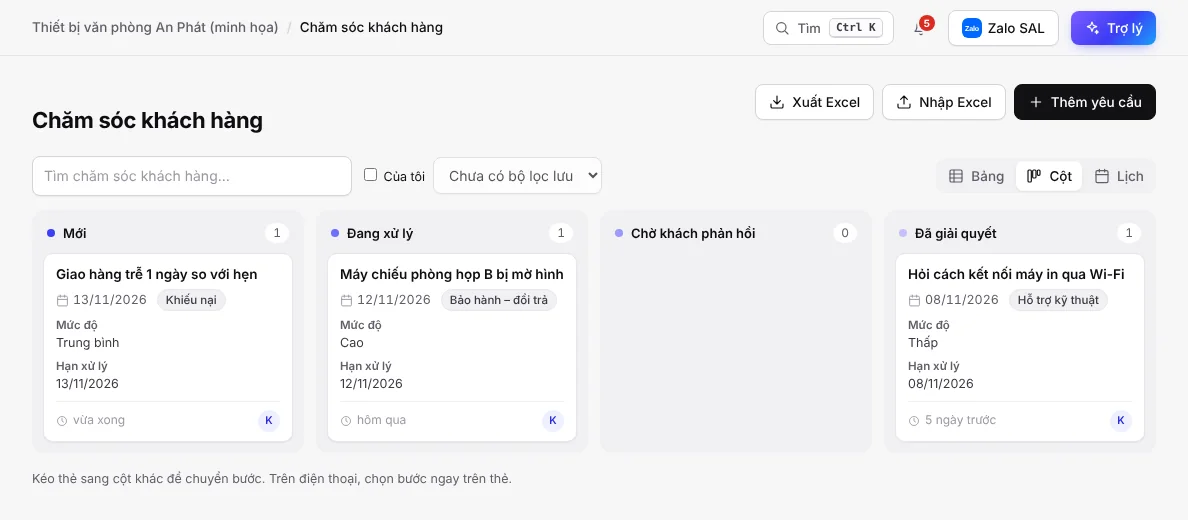
- Questions, technical support, complaints, warranty and returns; priority and resolution deadline
- Customers send requests themselves through the Submit a support request form
- Urgent requests or complaints: notify the manager immediately
- Overdue and unresolved: notify the manager; once resolved: email the customer
Sales report and monthly targets
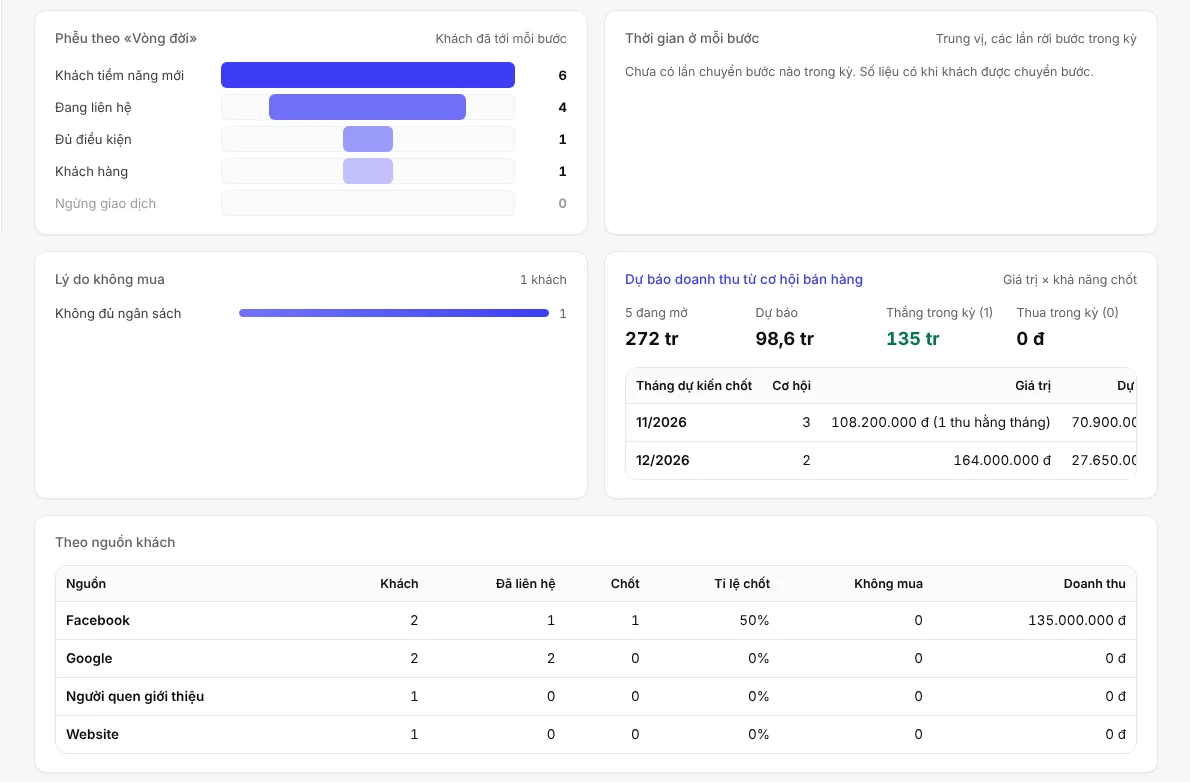
The Sales report page is calculated from customers, opportunities and contact history, for the last 7 days, 30 days, 90 days or 12 months.
On the Sales report page
- Customer funnel by lifecycle, time spent in each step, reasons for not buying
- Revenue forecast from opportunities: value times win probability, by expected close month
- By lead source: number of customers, close rate, revenue
- By person in charge: contacts made, deals closed, first response time, overdue call-backs
- Advertising cost and revenue by channel
Targets and other reports
- Monthly targets for revenue, deals closed and new customers, for the whole company and for each person
- Staff ranking based on actual results
- Marketing campaigns: budget, cost, customers brought in, cost per customer
- The template comes with more than 10 reports and more than 20 automations: assigning leads, assigning tasks, appointment reminders, moving steps
Choosing a CRM for a small business: 6 things to check
Whichever software you choose, try it with your own real data before you pay. The table below lists what to check, along with how SAL software does it.
| What to check | Why | In SAL software |
|---|---|---|
| Price per user | Why: Per-user pricing adds up quickly as you add staff. | In SAL software: Free plan for 1 person; Basic 299,000 VND/month for 3 people; extra users 49,000 VND/user/month. |
| Bringing old data in, getting data out | Why: Your customers are in Excel and notebooks today; if you change software later, you need to take your data with you. | In SAL software: Import from Excel; the business owner can download all data at any time. |
| Permissions | Why: Staff should only see the customers they are in charge of. | In SAL software: Role-based permissions; team leads see the customers of their whole team. |
| The channels customers message you on | Why: Customer messages should land in the same place as the customer profile. | In SAL: Zalo OA, Facebook Messenger and website chat land in one inbox; email customers straight from their record; Instagram via Pancake while Meta reviews. |
| Changing as your sales process changes | Why: Sales processes change with your products and your team. | In SAL software: Message the assistant to add fields, change steps or add reminders; preview before applying, and go back to an older version if needed. |
| Using it on a phone | Why: Salespeople often work outside the office. | In SAL software: Runs in the browser, on computers and phones. |
- SAL software is not yet a fit if you need full accounting software (general ledger, financial statements, tax return filing): the Accounting section shows monthly income, expenses, estimated profit and receivables and payables, but does not replace accounting software. Multi-warehouse stock and a unified ERP are in development.
- To compare with hiring a team to build custom software or with drag-and-drop tools, see Build your own management software with AI.
Get started in 3 steps
Sign up
Click Try the CRM and sign in with Google or email.
Pick a template
While your software is still empty, it shows the templates: pick Business CRM (any industry) or the template for your industry. The template is set up in seconds, with sample data to click through, removed with one button.
Import customers, invite staff
Import your customer list from Excel, invite your staff and choose a role for each person.
Industries with their own template: training centers, accounting and tax firms, plus clinics, spas, online shops, interior design and real estate (see the list of templates). Want to change a step or add a field? Message the assistant, for example: “Add a step Product demo done” or “Remind me to call customers back after 3 days”.
Price
One price list for every feature of SAL software. Monthly prices, excluding 10% VAT. Yearly = price of 10 months.
Free
0 VND
No time limit
- 1 user
Basic
299,000 VND/month
For shops and small teams
- 3 users
Professional
799,000 VND/month
For growing sales teams
- 10 users
Business
1,990,000 VND/month
For multiple departments
- 30 users
Plans also differ in assistant credits, messaging channels and websites. See full pricing
No time to build it yourself?
Setup package: SAL builds the software around how your business works, within 48 hours (Sundays excluded), then hands it over and trains your whole team; 1 month of the Professional plan included. Price 2,990,000 VND, launch price 1,990,000 VND for the first 10 businesses, excluding VAT. See the steps
Frequently asked questions
What is a CRM, and does a small business need one?
A CRM is customer management software: customers, contact history, sales opportunities and to-dos in one place. Small businesses usually start to need a CRM when two or more people look after customers, or when customers come from several channels and some start slipping through.
How much does SAL software cost?
The Free plan is 0 VND with no time limit, 1 user and 50 AI credits in the first month, then 15 credits a month. Basic is 299,000 VND/month (3 users), Professional 799,000 VND/month (10 users), Business 1,990,000 VND/month (30 users). Prices exclude 10% VAT; paying yearly costs the same as 10 months.
Is there a free trial?
There is a Free plan at 0 VND, with no time limit and no payment card needed, for 1 person. There is no time-limited trial; when several people need to work together, upgrade right inside the software.
Can I move my customer list over from Excel?
Yes. The Customers section has an Import Excel button to bring in the whole list at once, and an Export Excel button to download it. When you add a customer whose phone number or email already exists, the software asks first to avoid duplicates. See how to switch from Excel.
If an employee leaves, do we lose their customers?
No. Customers, contact history, opportunities and quotes are stored in the company's software, not on the employee's own phone. The owner or a manager reassigns those customers to someone else.
Can staff see each other's customers?
It depends on the role. Staff only see the customers they are in charge of; team leads see the customers of their whole team; the owner and managers see everything. Sensitive fields are encrypted and every view is logged.
Do Zalo and Facebook messages come into the CRM?
Zalo OA, Facebook Messenger and website chat messages land in one shared inbox; first-time senders become new customers, tagged with the channel as source. Facebook Messenger connects directly (Meta approved on 14/11/2026); Instagram is awaiting Meta review and connects via Pancake in the meantime.
Can I use the CRM on my phone?
Yes. The software runs in the browser at the same name.salapp.vn address on computers and phones; on phones there is a navigation bar at the bottom of the screen.
Is customer data safe?
Each business has its own software at name.salapp.vn with its own database, never shared with other businesses. Data on every plan is backed up daily; the business owner can download all data at any time. SAL staff can only get in when you grant time-limited access.
Try the CRM with your real customers
Sign up, pick the Business CRM template, import your customer list from Excel and you are ready to go.